
Hyundai Genesis (DH): BLUE LINK / BLUE LINK Remote Control Schematic Diagram
| Schematic Diagrams |
Removal 1. Remove the battery(-) terminals. 2. Remove the AVN monitor. (Body - "Premium AVN System" ) 3. Disconnect the cables and connectors (A) from the MTS unit.
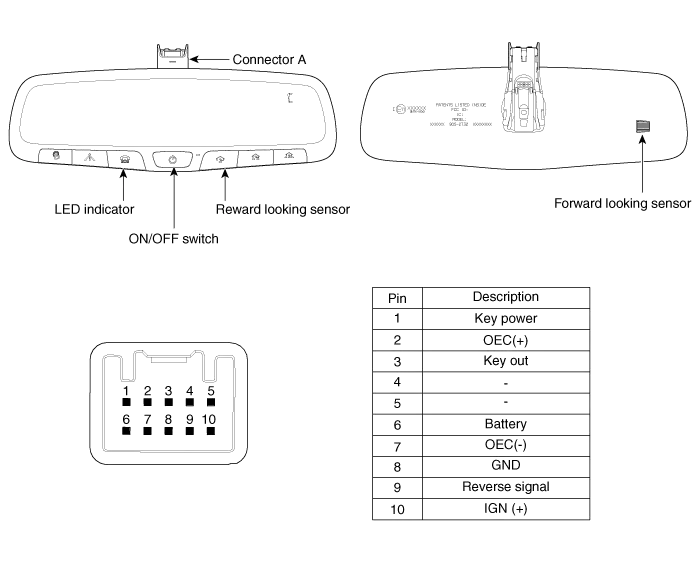
Removal 1. Remove the Electro chromic Inside rear view mirror. (Refer to Electro Chromic Inside Rear View Mirror) Installation 1. Install the Electro chromic Inside rear view mirror.
Other information:
Hyundai Genesis (DH) 2013-2016 Service Manual: Photo Sensor Description and Operation
Description The photo sensor is located in the right side of the inside rearview mirror. he integrated rain sensor is located in the right side of the inside rearview mirror. The integrated rain sensor is a multifunctional sensor which combines the photo sensor and auto light sensor, and has a built-in photovoltaic diode (for detecting t
Hyundai Genesis (DH) 2013-2016 Service Manual: Blower Motor Repair procedures
Inspection 1. Connect the battery voltage and check the blower motor rotation. 2. If the blower motor does not operate well, replace it with a genuine blower motor check for proper operation. 3. Replace the blower motor if it is proved that there is a problem with it.
Categories
- Manuals Home
- Hyundai Genesis Owners Manual
- Hyundai Genesis Service Manual
- General Information
- Description and Operation
- Suspension System
- New on site
- Most important about car
