
Hyundai Genesis (DH): Lighting System / Overhead Console Lamp Repair procedures
Hyundai Genesis (DH) 2013-2016 Service Manual / Body Electrical System / Lighting System / Overhead Console Lamp Repair procedures
| Inspection |
| 1. |
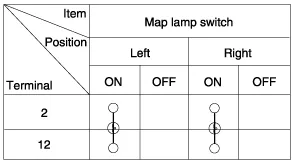
Remove the overhead console lamp assembly and check for
continuity between terminals. If the continuity is not as specified,
replace the map lamp switch.
|

| Removal |
| 1. |
Disconnect the negative (-) battery terminal. |
| 2. |
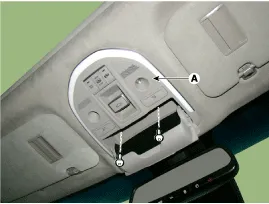
Remove the mounting screws (2EA).
And then remove the overhead console (A).
|
| 3. |
Remove the overhead console after disconnecting the connector (A).
|

| 4. |
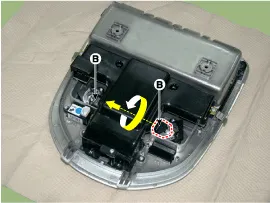
Remove the overhead console lamp (B) by turning the socket.
|
| Installation |
| 1. |
Install the overhead console lamp after connecting the connector. |
| 2. |
Install the lens after tightening 2 screws. |
Removal 1. Disconnect the negative (-) battery terminal. 2. Separate the room lamp (B) from the roof trim after disengaging the mounting clip (A).
Removal 1. Disconnect the negative (-) battery terminal. 2. Remove the front door trim. (Refer to Body - "Front Door Trim") 3. Disconnect the door mood lamp connectors (A).
Other information:
Hyundai Genesis (DH) 2013-2016 Service Manual: Components and Components Location
C
Hyundai Genesis (DH) 2013-2016 Service Manual: General Safety Information and Caution
Instructions When Handling Refrigerant 1. R-134a liquid refrigerant is highly volatile. A drop on the skin of your hand could result in localized frostbite. When handling the refrigerant, be sure to wear gloves. 2. It is standard practice to wear goggles or glasses to protect your eyes, and gloves to protect your hands.
Categories
- Manuals Home
- Hyundai Genesis Owners Manual
- Hyundai Genesis Service Manual
- Description and Operation
- Suspension System
- Evaporative Emission Control System
- New on site
- Most important about car

Copyright В© 2026 www.hgenesisdh.com - 0.0259