
Hyundai Genesis (DH): Engine And Transaxle Assembly / Engine Room Under Cover Repair procedures
| Removal and Installation |
| 1. |
Remove the front under cover (A). Remove the rear under cover(B).
|

| 2. |
Remove the RH/LH side cover (A).
|
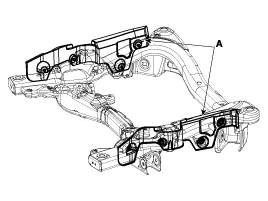
| 3. |
To install, reverse the removal procedure. |
Components [2WD] 1. Front under cover2. Rear under cover3. LH side cover4. RH side cover [AWD] 1. Front under cover2. Rear under cover3.
Components [2WD] 1. Engine mounting insulator assembly2. Engine support bracket LH3. Engine support bracket RH4. Transmission mounting insulator [AWD] 1.
Other information:
Hyundai Genesis (DH) 2013-2016 Service Manual: Rheostat Repair procedures
Inspection 1. Disconnect the negative (-) battery terminal. 2. Remove the crash pad lower panel. (Refer to Body - "Crash Pad Lower Panel") 3. Remove the lower crash pad switch assembly (A) after disengaging the mounting clip. 4. Remove the rheostat switch connector (A).
Hyundai Genesis (DH) 2013-2016 Service Manual: Repair procedures
Diagnosis With GDS 1. BSD system defects can be quickly diagnosed with the GDS. GDS operates actuator quickly to monitor, input/output value and self diagnosis. 2. Connect the cable of GDS to the data link connector in driver side crash pad lower panel, and turn on the GDS.
Categories
- Manuals Home
- Hyundai Genesis Owners Manual
- Hyundai Genesis Service Manual
- Electric Parking Brake (EPB) Repair procedures
- Body (Interior and Exterior)
- Restraint
- New on site
- Most important about car
