
Hyundai Genesis (DH): Cooling System / Cooling Fan Components and Components Location
| Components |
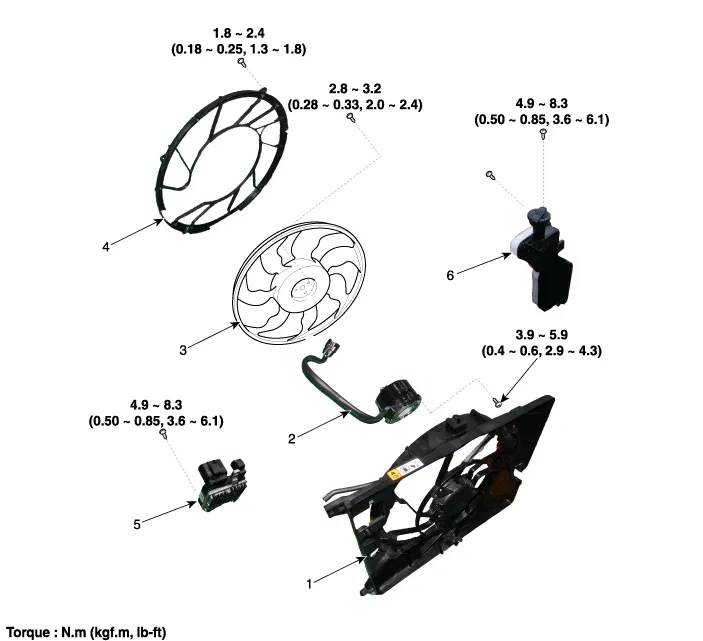
| 1. Cooling fan shroud 2. Cooing fan 3. Cooling fan motor | 4. Cooling far rear cover 5. Cooling fan controller (PWM) 6. Reservoir tank |
Replacement and Air Bleeding Never remove the radiator cap when the engine is hot. A serious scalding could be caused by high-pressure hot fluid escaping from the radiator.
Description The cooling fan controlsx the cooling fan motor voltage depending on the duty output from the ECU (Freq.: 300Hz). [Signal from the ECU to the PWM (SI: 300Hz)] SI DutyMotor Voltage (V)Variation (V)10%0
Other information:
Hyundai Genesis (DH) 2013-2016 Service Manual: LKAS Unit Repair procedures
Removal 1. Disconnect the negative (-) battery terminal. 2. Remove the mirror wiring cover (A) and rain sensor cover (B). 3. Remove the LKAS unit connector (A). 4. Remove the LKAS unit after disengaging the mounting bracket (A). Installation 1.
Hyundai Genesis (DH) 2013-2016 Service Manual: Compressor oil Repair procedures
Oil Specification 1. The HFC-134a system requires synthetic (PAG) compressor oil whereas the R-12 system requires mineral compressor oil. The two oils must never be mixed. 2. Compressor (PAG) oil varies according to compressor model. Be sure to use oil specified for the compressor model.
Categories
- Manuals Home
- Hyundai Genesis Owners Manual
- Hyundai Genesis Service Manual
- General Information
- Components and Components Location
- Evaporative Emission Control System
- New on site
- Most important about car
