
Hyundai Genesis (DH): Electro Chromic Inside Rear View Mirror / Repair procedures
| Inspection |
| 1. |
Turn the ignition key to the "ON" position. |
| 2. |
Cover the forward facing sensor. |
| 3. |
Head a light to the rearward-facing sensor. |
| 4. |
The ECM shall dim as soon as the rearward-facing sensor detects a certain level of brightness.
|

| 5. |
In the reverse gear, the ECM shall not dim.
When directing light to both the forward-facing and rearward-facing sensors, the ECM shall not dim. |
| Removal |
| 1. |
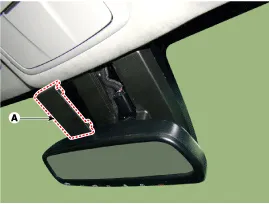
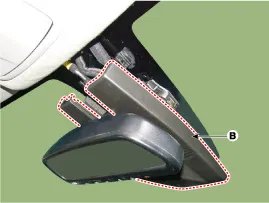
Remove the mirror wiring cover (A) and rain sensor cover (B).
|
| 2. |
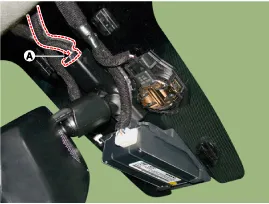
Remove the mirror connector (A).
|
| 3. |
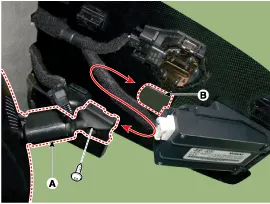
Remove the mirror (A) by pulling up the mirror in the arrow direction below.
|
| Installation |
| 1. |
When installing the mirror, be careful not to damage the mounting bracket. |
| 2. |
Install the mirror wiring cover and rain sensor cover after reconnecting the connector and tightening the screw. |
Description The ECM (Electro Chromatic inside rear view Mirror) automatically dims when it senses light reflecting in the rear view mirror. The forward facing sensor detects brightness of the surroundings, while the rearward looking sensor is for the light from the rear.
Other information:
Hyundai Genesis (DH) 2013-2016 Service Manual: Compressor Repair procedures
Removal 1. If the compressor is marginally operable, run the engine at idle speed, and let the air conditioning work for a few minutes, then shut the engine off. 2. Disconnect the negative (-) battery terminal. 3. Remove the engine room cover.
Hyundai Genesis (DH) 2013-2016 Service Manual: Mode Control Actuator Repair procedures
Inspection 1. Turn the ignition switch OFF. 2. Disconnect the mode control actuator connector. 3. Verify that the mode control actuator operates to the defrost mode when connecting 12V to terminal 3 and grounding terminal 4. Verify that the mode control actuator operates to the vent mode when connected in reverse.
Categories
- Manuals Home
- Hyundai Genesis Owners Manual
- Hyundai Genesis Service Manual
- Description and Operation
- Description and Operation
- Engine Mechanical System
- New on site
- Most important about car
