
Hyundai Genesis (DH): Air Conditioning System / Photo Sensor Repair procedures
Hyundai Genesis (DH) 2013-2016 Service Manual / Heating, Ventilation and Air Conditioning / Air Conditioning System / Photo Sensor Repair procedures
| Inspection |
| 1. |
Turn the ignition switch ON. |
| 2. |
Connect the GDS. |
| 3. |
Emit intensive light toward the photo sensor using a lamp, and check the output voltage change. |
| 4. |
The voltage will rise with higher intensive light and fall with lower intensive light.
|

| Replacement |
| 1. |
Disconnect the negative (-) battery terminal. |
| 2. |
Using a screwdriver or remover, remove the inside rearview mirror cover (A).
|
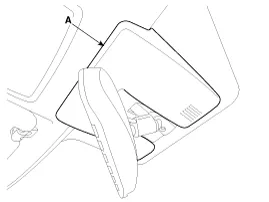
| 3. |
Disconnect the photo sensor connector, and then remove the sensor (A).
|

| 4. |
Install in the reverse order of removal. |
Description The photo sensor is located in the right side of the inside rearview mirror. he integrated rain sensor is located in the right side of the inside rearview mirror.
Description The ambient temperature sensor is located inside the side mirror and detects ambient air temperature. It is a negative type thermistor; resistance will increase with lower temperature, and decrease with higher temperature.
Other information:
Hyundai Genesis (DH) 2013-2016 Service Manual: High Mounted Stop Lamp Repair procedures
Removal High Mounted Stop Lamp 1. Disconnect the negative (-) battery terminal. 2. Remove the roof trim assembly. (Refer to Body - "Roof Trim") 3. Remove the high mounted stop lamp assembly (A) after loosening the mounting screws. Installation 1.
Hyundai Genesis (DH) 2013-2016 Service Manual: Components and Components Location
S
Categories
- Manuals Home
- Hyundai Genesis Owners Manual
- Hyundai Genesis Service Manual
- Body (Interior and Exterior)
- Suspension System
- Repair procedures
- New on site
- Most important about car

Copyright В© 2026 www.hgenesisdh.com - 0.0326