
Hyundai Genesis (DH): Parking Guide System (PGS) / PGS Unit (Back & Blinde Unit) Repair procedures
| Removal |
| 1. |
Disconnect the negative (-) battery terminal. |
| 2. |
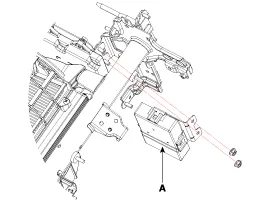
Remove the glove box housing (A).
(Refer to Body - "Glove Box") |
| 3. |
Remove the PGS unit (A) after loosening the nuts.
|
| Installation |
| 1. |
Install the PGS unit. |
| 2. |
Install the glove box housing. |
| 3. |
Connector the negative (-) battery terminal. |
Circuit Diagram Input / Output Terminal Voltage No.SignalDescriptionlevel1ACCACCOFF(Less than 1V), ON(More than 8V)4C-CAN-LHigh Speed CAN low-11V-OUTVideo Out-13IGNIGN SignalON(More than 9V) / OFF(Less than 1V)16C-CAN-HHigh Speed CAN high-18GND-RRear Camera GND-19REAR-POWERVCC-REARON(6~7V) / OFF(Less than 1V)20V-IN-RRear Video Input-20VGND-RRear Video Gnd-22SERIAL LINETop View Control-24VGNDVideo Out GND-
Other information:
Hyundai Genesis (DH) 2013-2016 Service Manual: Auto Light Sensor Repair procedures
Removal 1. Disconnect the negative (-) battery terminal. 2. Remove the photo & auto light sensor. (Refer to Windshield Wiper/Washer - "Rain Sensor") Installation 1. Install the auto light sensor. 2. Connect the negative (-) battery terminal.
Hyundai Genesis (DH) 2013-2016 Service Manual: Blower Unit Components and Components Location
Component Location Components 1. Seal2. Intake Duct Case3. Intake Door4. Intake Actuator5. Intake Duct Case (A)6. Climate Control Air Filter7. Climate Control Air Filter Cover8. Cluster Ionizer9. Blower Upper Case10. Blower Lower Case11. Power Mosfet12.
Categories
- Manuals Home
- Hyundai Genesis Owners Manual
- Hyundai Genesis Service Manual
- Components and Components Location
- Description and Operation
- Parking Assist Sensor Repair procedures
- New on site
- Most important about car
