
Hyundai Genesis (DH): Parking Guide System (PGS) / PGS Unit (Back & Blinde Unit) Schematic Diagrams
Hyundai Genesis (DH) 2013-2016 Service Manual / Body Electrical System / Parking Guide System (PGS) / PGS Unit (Back & Blinde Unit) Schematic Diagrams
| Circuit Diagram |
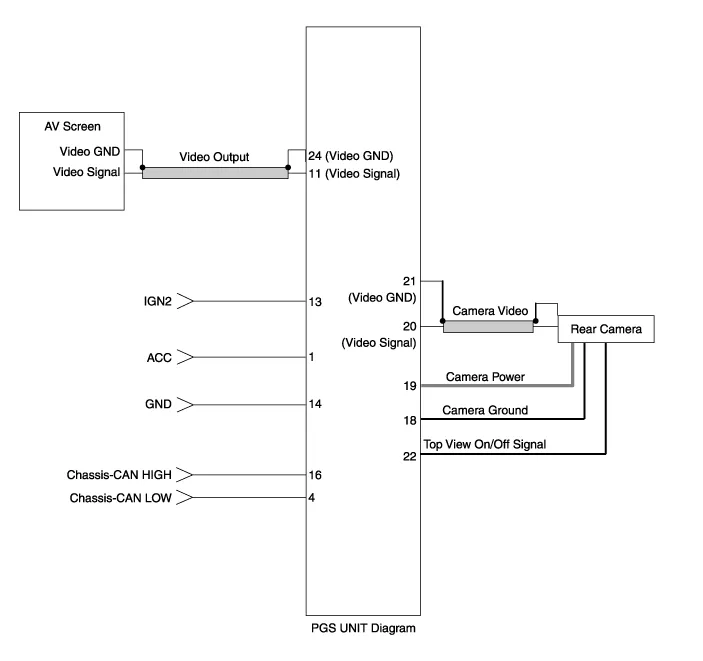
Input / Output Terminal Voltage
| No. | Signal | Description | level |
| 1 | ACC | ACC | OFF(Less than 1V), ON(More than 8V) |
| 4 | C-CAN-L | High Speed CAN low | - |
| 11 | V-OUT | Video Out | - |
| 13 | IGN | IGN Signal | ON(More than 9V) / OFF(Less than 1V) |
| 16 | C-CAN-H | High Speed CAN high | - |
| 18 | GND-R | Rear Camera GND | - |
| 19 | REAR-POWER | VCC-REAR | ON(6~7V) / OFF(Less than 1V) |
| 20 | V-IN-R | Rear Video Input | - |
| 20 | VGND-R | Rear Video Gnd | - |
| 22 | SERIAL LINE | Top View Control | - |
| 24 | VGND | Video Out GND | - |
Removal 1. Disconnect the negative (-) battery terminal. 2. Remove the glove box housing (A). (Refer to Body - "Glove Box") 3. Remove the PGS unit (A) after loosening the nuts.
Categories
- Manuals Home
- Hyundai Genesis Owners Manual
- Hyundai Genesis Service Manual
- Starter Repair procedures
- Electric Parking Brake (EPB) Repair procedures
- General Information
- New on site
- Most important about car

Copyright В© 2026 www.hgenesisdh.com - 0.0427