
Hyundai Genesis (DH): ECS(Electronic Control Suspension) System / ECS-G Sensor Repair procedures
Hyundai Genesis (DH) 2013-2016 Service Manual / Suspension System / ECS(Electronic Control Suspension) System / ECS-G Sensor Repair procedures
| Replacement |
Front
| 1. |
Loosen the wheel nuts slightly. Raise the vehicle, and make sure it is securely supported. |
| 2. |
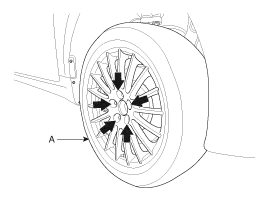
Remove the front wheel and tire (A) from the front hub.
|

| 3. |
Remove the wheel guard. |
| 4. |
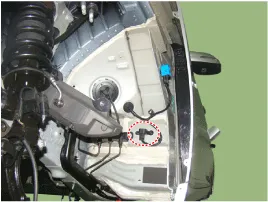
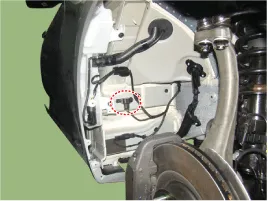
Loosen the bolt and then remove the G-Sensor.
[Right front]
[Left front]
|
Rear
| 1. |
Loosen the wheel nuts slightly. Raise the vehicle, and make sure it is securely supported. |
| 2. |
Remove the front wheel and tire (A) from the rear hub.
|
| 3. |
Remove the trunk luggage side trim [RH].
(Refer to Body - "Trunk Trim") |
| 4. |
Loosen the bolt and then remove the G-Sensor.
|

| Installation |
| 1. |
Installation in the reverse order of removal. |
| 2. |
Perform the ESC variant coding.
(Refer to ECS (Electronic Control Suspension) System - "ECS Control Unit") |
Replacement 1. Disconnect the battery (-) terminal. 2. Remove the trunk luggage side trim [RH]. (Refer to Body - "Trunk Trim") 3. Disconnect the connector and then remove the ECS control unit.
Other information:
Hyundai Genesis (DH) 2013-2016 Service Manual: Front Fog Lamps Repair procedures
Removal 1. Disconnect the negative (-) battery terminal. 2. Remove the front bumper. (Refer to Body - "Front Bumper Cover") 3. Disconnect the front fog lamp connector (A). 4. Remove the front fog lamp assembly (A) after loosening the mounting nut.
Hyundai Genesis (DH) 2013-2016 Service Manual: Photo Sensor Repair procedures
Inspection 1. Turn the ignition switch ON. 2. Connect the GDS. 3. Emit intensive light toward the photo sensor using a lamp, and check the output voltage change. 4. The voltage will rise with higher intensive light and fall with lower intensive light.
Categories
- Manuals Home
- Hyundai Genesis Owners Manual
- Hyundai Genesis Service Manual
- Engine Mechanical System
- Restraint
- Description and Operation
- New on site
- Most important about car

Copyright В© 2026 www.hgenesisdh.com - 0.0324