
Hyundai Genesis (DH): Power Trunk Module / Power Trunk Module Drive Unit Repair procedures
Hyundai Genesis (DH) 2013-2016 Service Manual / Body Electrical System / Power Trunk Module / Power Trunk Module Drive Unit Repair procedures
| Removal |
|

| 1. |
Disconnect the negative (-) battery terminal. |
| 2. |
Remove the left trunk trim after opening the trunk.
(Refer to Body - "Trunk Trim") |
| 3. |
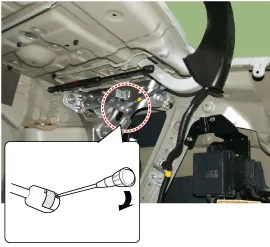
Separate the power trunk module push rod pin (A) and then remove the power trunk module connecting rod (B).
|
| 4. |
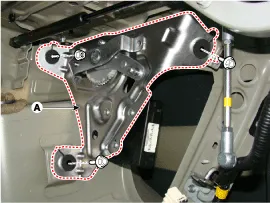
Remove the power trunk module & drive unit (A) after disconnecting the connector, bolts and nuts.
|
| 5. |
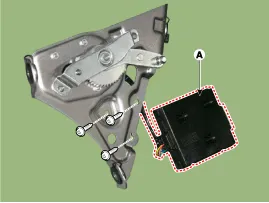
Remove the power trunk module (A) after loosening the mounting screws.
|
| Installation |
| 1. |
Tighten the power trunk module & drive unit mounting bolts and nuts.
|
| 2. |
Install the push rod in the hinge ball joint. |
| 3. |
Connect the control unit connectors. |
| 4. |
Install the right trunk trim. |
| 5. |
Check that the power trunk operates normally after connecting the negative (-) battery terminal.
|

| Inspection |
| 1. |
Disconnect the negative (-) battery terminal. |
| 2. |
Remove the left trunk trim.
(Refer to Body - "Trunk Trim") |
| 3. |
Remove the motor connector. |
| 4. |
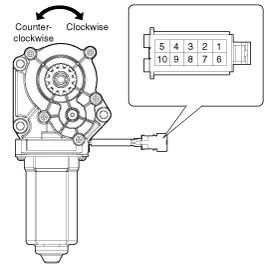
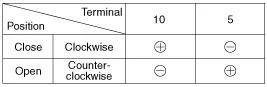
Connect the motor terminals directly to battery voltage (12V)
and check that the motor operates smoothly. Next, reverse the polarity
and check that the motor operates smoothly in the reverse direction. If
the operation is abnormal, replace the motor.
|
Description 1. Power trunk drive unit(Trunk open) A. The trunk open switch operates. (Trunk outside handle switch, Crash pad switch, SMK trunk open button) B.
Other information:
Hyundai Genesis (DH) 2013-2016 Service Manual: Auto Light Sensor Repair procedures
Removal 1. Disconnect the negative (-) battery terminal. 2. Remove the photo & auto light sensor. (Refer to Windshield Wiper/Washer - "Rain Sensor") Installation 1. Install the auto light sensor. 2. Connect the negative (-) battery terminal.
Hyundai Genesis (DH) 2013-2016 Service Manual: Head Up Display Unit Troubleshooting
T
Categories
- Manuals Home
- Hyundai Genesis Owners Manual
- Hyundai Genesis Service Manual
- Description and Operation
- Engine Electrical System
- Electric Parking Brake (EPB) Repair procedures
- New on site
- Most important about car

Copyright В© 2026 www.hgenesisdh.com - 0.0326