
Hyundai Genesis (DH): Premium AVN System / Mic Repair procedures
Hyundai Genesis (DH) 2013-2016 Service Manual / Body Electrical System / Premium AVN System / Mic Repair procedures
| Inspection |
| 1. |
Disconnect the negative battery terminal(-). |
| 2. |
Remove the overhead console. |
| 3. |
Remove the screws(A) and connector, Remove the hands-free mic(B).
|
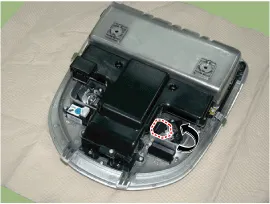
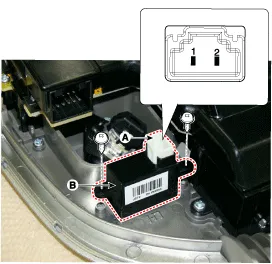
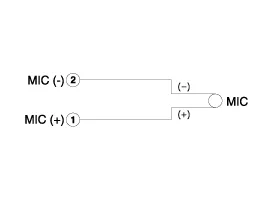
| 4. |
Check the continuity of mic between terminals
|
Removal 1. Disconnect the battery(-)terminals. 2. Remove the floor console assembly. (Refer to Body - "Floor Console Assembly") 3. Remove the multimedia jack tray (A) after loosening the screws from the floor console (B).
Other information:
Hyundai Genesis (DH) 2013-2016 Service Manual: Description and Operation
System Overview RPAS (Rear Parking Assist System) is an electronic driving aid that warns the driver to be cautious while parking or driving at low speed. The sensor uses ultrasonic waves to detect objects within proximity of the vehicle. RPAS consists of four RPS sensors which are detecting the obstacles and transmit the result separat
Hyundai Genesis (DH) 2013-2016 Service Manual: Components and Components Location
C
Categories
- Manuals Home
- Hyundai Genesis Owners Manual
- Hyundai Genesis Service Manual
- Electric Parking Brake (EPB) Repair procedures
- Engine Mechanical System
- Description and Operation
- New on site
- Most important about car

Copyright В© 2026 www.hgenesisdh.com - 0.0189