
Hyundai Genesis (DH): Premium AVN System / AUX jack Repair procedures
Hyundai Genesis (DH) 2013-2016 Service Manual / Body Electrical System / Premium AVN System / AUX jack Repair procedures
| Removal |
| 1. |
Disconnect the battery(-)terminals. |
| 2. |
Remove the floor console assembly.
(Refer to Body - "Floor Console Assembly") |
| 3. |
Remove the multimedia jack tray (A) after loosening the screws from the floor console (B).
|
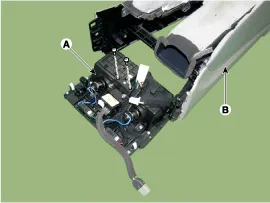
| 4. |
Remove the multimedia jack (B) from the floor console after disengaging the fixed hooks (A).
|
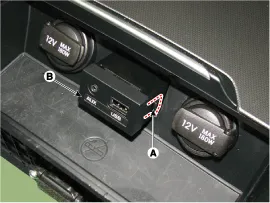
| Installation |
| 1. |
Connect the multimedia jack connector. |
| 2. |
Install the multimedia jack. |
| 3. |
Install the center fascia lower tray.
|

Description The multimedia jack on the console upper cover is for customers who like to listen to external portable music players like the MP3 and etc.
Inspection 1. Disconnect the negative battery terminal(-). 2. Remove the overhead console. 3. Remove the screws(A) and connector, Remove the hands-free mic(B).
Other information:
Hyundai Genesis (DH) 2013-2016 Service Manual: Specifications
S
Hyundai Genesis (DH) 2013-2016 Service Manual: Intake Actuator Repair procedures
Inspection 1. Turn the ignition switch OFF. 2. Disconnect the intake actuator connector. 3. Verify that the intake actuator operates to the fresh position when connecting 12V to terminal 3 and grounding terminal 4. Verify that the intake actuator operates to the recirculation position when connected in reverse.
Categories
- Manuals Home
- Hyundai Genesis Owners Manual
- Hyundai Genesis Service Manual
- 4 Wheel Drive (AWD) System
- Description and Operation
- Engine Electrical System
- New on site
- Most important about car

Copyright В© 2026 www.hgenesisdh.com - 0.0272