
Hyundai Genesis (DH): Timing System / Idler Repair procedures
Hyundai Genesis (DH) 2013-2016 Service Manual / Engine Mechanical System / Timing System / Idler Repair procedures
| Removal and Installation |
| 1. |
Remove the drive belt.
(Refer to Timing System - "Drive Belt") |
| 2. |
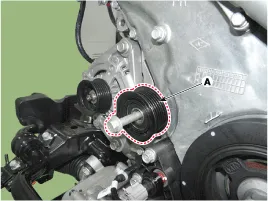
Remove the drive belt idler (A).
|
| 3. |
To install, reverse the removal procedure. |
| Inspection |
Drive belt, Idler, Belt tensioner pulley
| 1. |
Check the idler for excessive oil leakage, abnormal rotation or vibration. Replace if necessary. |
| 2. |
Check the belt tensioner for excessive dust, crack, and damage. Replace if necessary. |
| 3. |
Check belt for maintenance and abnormal wear of V-ribbed part. Replace if necessary. |
| 4. |
Check the pulleys for vibration in rotation, oil or dust deposit of V-ribbed part. Replace if necessary. |
Components 1. Idler
Components 1. Drive belt tensioner
Other information:
Hyundai Genesis (DH) 2013-2016 Service Manual: General Safety Information and Caution
Instructions When Handling Refrigerant 1. R-134a liquid refrigerant is highly volatile. A drop on the skin of your hand could result in localized frostbite. When handling the refrigerant, be sure to wear gloves. 2. It is standard practice to wear goggles or glasses to protect your eyes, and gloves to protect your hands.
Hyundai Genesis (DH) 2013-2016 Service Manual: Evaporator Temperature Sensor Repair procedures
I
Categories
- Manuals Home
- Hyundai Genesis Owners Manual
- Hyundai Genesis Service Manual
- Engine Electrical System
- Components and Components Location
- Description and Operation
- New on site
- Most important about car

Copyright В© 2026 www.hgenesisdh.com - 0.0269