
Hyundai Genesis (DH): Timing System / Drive Belt Tensioner Components and Components Location
| Components |
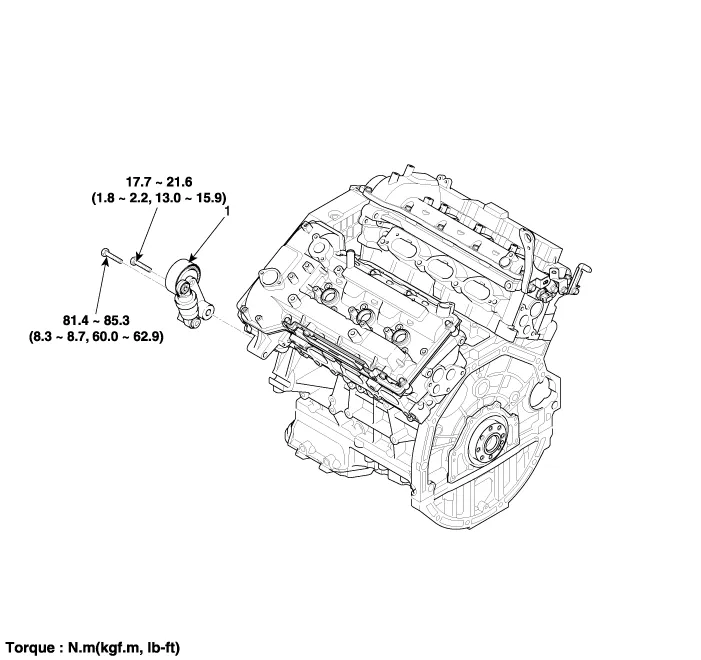
| 1. Drive belt tensioner |
Removal and Installation 1. Remove the drive belt. (Refer to Timing System - "Drive Belt") 2. Remove the drive belt idler (A). Tightening torque : 44.
Removal and Installation 1. Remove the drive belt. (Refer to Timing System - "Drive Belt") 2. Remove the drive belt auto tensioner (A). Tightening torque Bolt (B) : 81.
Other information:
Hyundai Genesis (DH) 2013-2016 Service Manual: Mode Control Actuator Repair procedures
Inspection 1. Turn the ignition switch OFF. 2. Disconnect the mode control actuator connector. 3. Verify that the mode control actuator operates to the defrost mode when connecting 12V to terminal 3 and grounding terminal 4. Verify that the mode control actuator operates to the vent mode when connected in reverse.
Hyundai Genesis (DH) 2013-2016 Service Manual: Auto Defogging Actuator Repair procedures
Inspection 1. Turn the ignition switch OFF. 2. Disconnect the auto defogging connector. 3. Verify that the auto defogging actuator operates to the open position when connecting 12V to terminal 3 and grounding terminal 4. Verify that the auto defogging actuator operates to the close position when connected in reverse.
Categories
- Manuals Home
- Hyundai Genesis Owners Manual
- Hyundai Genesis Service Manual
- Body Electrical System
- Restraint
- Body (Interior and Exterior)
- New on site
- Most important about car
