
Hyundai Genesis (DH): Timing System / Drive Belt Tensioner Repair procedures
Hyundai Genesis (DH) 2013-2016 Service Manual / Engine Mechanical System / Timing System / Drive Belt Tensioner Repair procedures
| Removal and Installation |
| 1. |
Remove the drive belt.
(Refer to Timing System - "Drive Belt") |
| 2. |
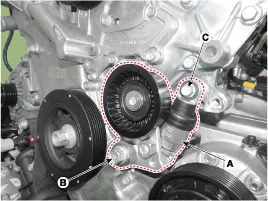
Remove the drive belt auto tensioner (A).
|
| 3. |
To install, reverse the removal procedure. |
| Inspection |
Drive belt, Idler, Belt tensioner pulley
| 1. |
Check the idler for excessive oil leakage, abnormal rotation or vibration. Replace if necessary. |
| 2. |
Check the belt tensioner for excessive dust, crack, and damage. Replace if necessary. |
| 3. |
Check belt for maintenance and abnormal wear of V-ribbed part. Replace if necessary. |
| 4. |
Check the pulleys for vibration in rotation, oil or dust deposit of V-ribbed part. Replace if necessary. |
Components 1. Drive belt tensioner
Components 1. Crankshaft pulley
Other information:
Hyundai Genesis (DH) 2013-2016 Service Manual: Specifications
S
Hyundai Genesis (DH) 2013-2016 Service Manual: In-car Sensor Description and Operation
Description An in-car air temperature sensor is located in the crash pad lower panel. The sensor contains a thermistor which measures the temperature of the cabin. The signal determined by the resistance value which changes in accordance with perceived inside temperature, is delivered to the heater control unit and according to this signa
Categories
- Manuals Home
- Hyundai Genesis Owners Manual
- Hyundai Genesis Service Manual
- Parking Assist Sensor Repair procedures
- Description and Operation
- 4 Wheel Drive (AWD) System
- New on site
- Most important about car

Copyright В© 2026 www.hgenesisdh.com - 0.0287