
Hyundai Genesis (DH): General Information / Description and Operation
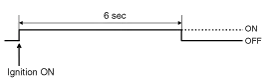
| Warning Lamp Activation |
| Warning Lamp Behavior after Ignition On |
| 1. |
Active fault or historical fault counter is greater or equal to 10.
|

| 2. |
Normal or historical fault counter is less than 10.
|
| 3. |
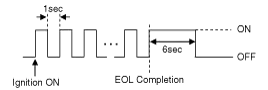
When turning the ignition switch ON during variant coding
(EOL) mode, the airbag warning lamp is turned on and blinks at intervals
of 1 second till the coding is completed.
In case the variant coding is normally completed, the airbag
warning lamp is turned on for 6 seconds, and then turned off. Otherwise
the airbag warning lamp continuously blinks at intervals of 1 second.
When there is active fault in the airbag system or SRSCM
internal fault, the variant coding (EOL) cannot be completed. In this
case, do the variant coding (EOL) procedure again after troubleshooting
with the GDS. |

| 1. |
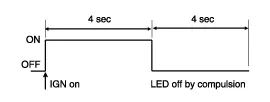
Loss of battery supply to the SRSCM : warning lamp is turned on continuously. |
| 2. |
Loss of internal operating voltage : warning lamp is turned on continuously. |
| 3. |
Loss of microprocessor operation : warning lamp is turned on continuously. |
| 4. |
SRSCM not connected : warning lamp is turned on continuously. |
| Occupant Status | Telltale Lamp | PAB |
| Empty | ON | Disabled |
| Child (Small Occupant) | ON | Disabled |
| Adult (Large Occupant) | OFF | Enabled |
| Defect | OFF | Enabled |
Precautions General Precautions Please read the following precautions carefully before performing the airbag system service. Observe the instructions described in this manual, or the airbags could accidentally deploy and cause damage or injuries.
Component Replacement after Deployment Before doing any SRS repairs, use the GDS to check for DTCs. Refer to the Diagnostic Trouble Code list for repairing of the related DTCs.
Other information:
Hyundai Genesis (DH) 2013-2016 Service Manual: A/C Pressure Transducer Description and Operation
Description The A/C Pressure Transducer (APT) converts the pressure value of high-pressure line into voltage value after measuring it. By converted voltage value, engine ECU controls the cooling fan by operating it at high speed or low speed.
Hyundai Genesis (DH) 2013-2016 Service Manual: Photo Sensor Repair procedures
Inspection 1. Turn the ignition switch ON. 2. Connect the GDS. 3. Emit intensive light toward the photo sensor using a lamp, and check the output voltage change. 4. The voltage will rise with higher intensive light and fall with lower intensive light.
Categories
- Manuals Home
- Hyundai Genesis Owners Manual
- Hyundai Genesis Service Manual
- Suspension System
- Transmission Control Module (TCM) Repair procedures
- General Information
- New on site
- Most important about car
