
Hyundai Genesis (DH): Intake And Exhaust System / Air Cleaner Repair procedures
Hyundai Genesis (DH) 2013-2016 Service Manual / Engine Mechanical System / Intake And Exhaust System / Air Cleaner Repair procedures
| Removal and Installation |
[Air Cleaner Assembly]
| 1. |
Disconnect the battery "-" terminal from the trunk room. |
| 2. |
Remove the engine cover.
(Refer to Engine And Transaxle Assembly - "Engine Cover") |
| 3. |
Remove the engine room cover.
(Refer to Engine And Transaxle Assembly - "Engine Cover") |
| 4. |
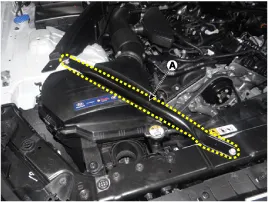
Remove the front strutbar (A).
|
| 5. |
Remove the air intake hose and air cleaner assembly.
|

| 6. |
To install, reverse the removal procedure. |
[Air Cleaner Element]
| 1. |
Disconnect the battery "-" terminal from the trunk room. |
| 2. |
Remove the engine cover. |
| 3. |
Remove the engine room cover.
(Refer to Engine And Transaxle Assembly - "Engine Cover") |
| 4. |
Remove the front strutbar (A).
|
| 5. |
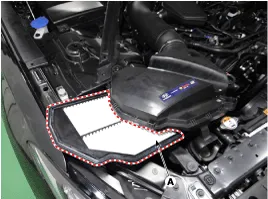
Remove the retaining clips air cleaner cover, and then the air cleaner element (A).
|
| 6. |
To install, reverse the removal procedure. |
Components 1. Air cleaner cover2. Air cleaner element3. Air cleaner body4. Air intake hose5. Resonator6. Intake air temperature sensor (IATS)
Removal and Installation 1. Disconnect the battery "-" terminal from the trunk room. 2. Remove the engine cover. (Refer to Engine And Transaxle Assembly - "Engine Cover") 3.
Other information:
Hyundai Genesis (DH) 2013-2016 Service Manual: License Lamps Repair procedures
Removal 1. Disconnect the negative (-) battery terminal. 2. Remove the trunk lid panel. (Refer to Body - "Trunk Lid Back Panel") 3. Remove the license lamp after disengaging the license lamp mounting clip (A) 4. Remove the license lamp assembly after disconnecting the license connector (A).
Hyundai Genesis (DH) 2013-2016 Service Manual: Head Up Display Unit Troubleshooting
T
Categories
- Manuals Home
- Hyundai Genesis Owners Manual
- Hyundai Genesis Service Manual
- Engine Mechanical System
- Engine Electrical System
- Suspension System
- New on site
- Most important about car

Copyright В© 2026 www.hgenesisdh.com - 0.0244