
Hyundai Genesis (DH): Blind Spot Detection system / Blind Spot Detection Switch Repair procedures
Hyundai Genesis (DH) 2013-2016 Service Manual / Body Electrical System / Blind Spot Detection system / Blind Spot Detection Switch Repair procedures
| Removal |
| 1. |
Disconnect the negative (-) battery terminal. |
| 2. |
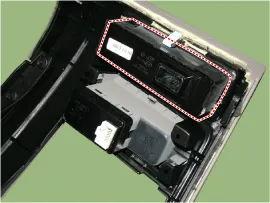
Remove the crash pad lower panel.
(Refer to Body - "Crash Pad") |
| 3. |
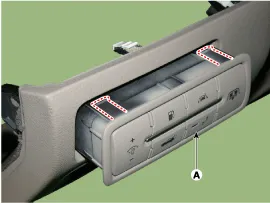
Remove the blind spot detection (BSD) switch (A) after disengaging the mounting clip.
|
| Installation |
| 1. |
Install the crash pad side switch assembly after connecting the connector. |
| 2. |
Install the crash pad lower panel. |
| Inspection |
| 1. |
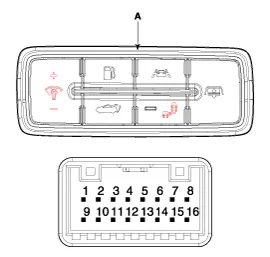
Disconnect the BSD switch connector.
|
| 2. |
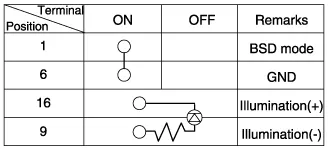
Operate the BSD switch, then check for continuity between terminals of BSD switch connector.
|
Circuit Diagram
Components 1. AVM Camera2. Ambient temperature sensor3. Puddle lamp
Other information:
Hyundai Genesis (DH) 2013-2016 Service Manual: Specifications
S
Hyundai Genesis (DH) 2013-2016 Service Manual: Troubleshooting
Troubleshooting Problem Symptoms Table Before replacing or repairing air conditioning components, first determine if the malfunction is due to the refrigerant charge, air flow or compressor. Use the table below to help you find the cause of the problem.
Categories
- Manuals Home
- Hyundai Genesis Owners Manual
- Hyundai Genesis Service Manual
- Active Air Flap(AAF) Repair procedures
- Emission Control System
- Electric Parking Brake (EPB) Repair procedures
- New on site
- Most important about car

Copyright В© 2026 www.hgenesisdh.com - 0.0292