
Hyundai Genesis (DH): IMS(Integrated Memory System) / Tilt & Telescope Control (SCM) Repair procedures
| Inspection |
| 1. |
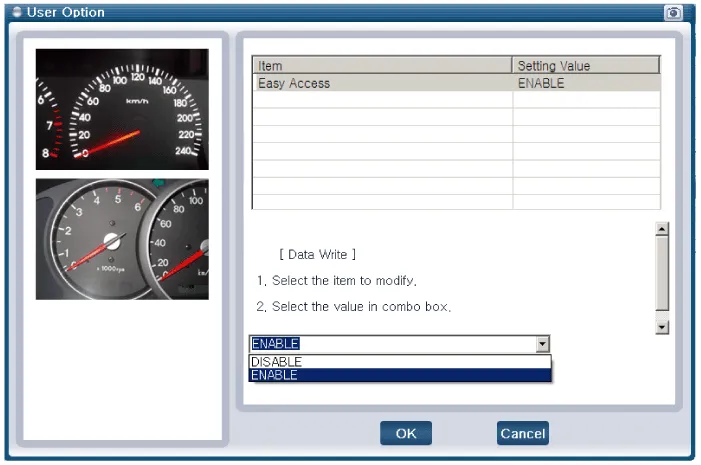
You can turn ON/OFF of IMS tilt & telescope control option with the user option program. |
| 2. |
Select model and "body control module" menu. |
| 3. |
Select the "Steering Limit Position Setting".
|
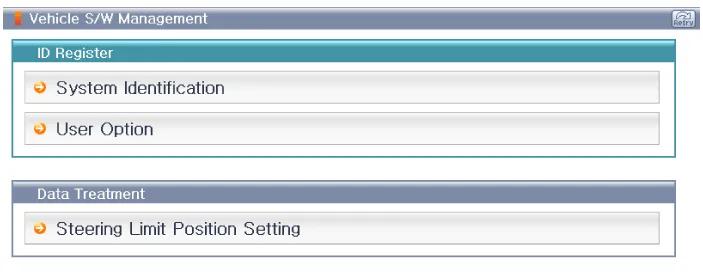
| 4. |
Select the "ENABLE".
|
Circuit Diagram NO.Function (Connector A)NO.Function (Connector B)1B+ (ECU)1Tele motor backward (tele in)2Sensor VCC2Tilt motor up3Tilt sensor3Tilt motor down4Tele sensor4Tele motor forward (tele out)5Tilt up switch5Power GND6Tele backward (tele in) 5W6-7-7Power B+8B_CAN_High8-9B_CAN_Low9-10ECU GND10-11IGN111-12Sensor GND12-13-13-14-14-15Tilt down switch15-16Tele forward (tele out) switch16-17-17-18-18-19-19-20-20-
Other information:
Hyundai Genesis (DH) 2013-2016 Service Manual: Auto Head Lamp Leveling Unit Description and Operation
Description According to driving environment and loading state of vehicle, head lamp lighting direction is changed to keep the driver's visibility range and to protect the driver's vision from glare, aiming at safety driving. Sensor integrated ECU mounting on the rear center arm drives the actuator mounting on the head lamp since sens
Hyundai Genesis (DH) 2013-2016 Service Manual: Description and Operation
Description Control Function This system supports 2 kinds of main function. (Rear video display function, Expected trace of wheels display function) The Rear video display and the expected trace of wheels display operate according to Vehicle speed condition and Gear position.
Categories
- Manuals Home
- Hyundai Genesis Owners Manual
- Hyundai Genesis Service Manual
- General Information
- Description and Operation
- Repair procedures
- New on site
- Most important about car
