
Hyundai Genesis (DH): Brake System / Stop Lamp Switch Components and Components Location
| Components Location |
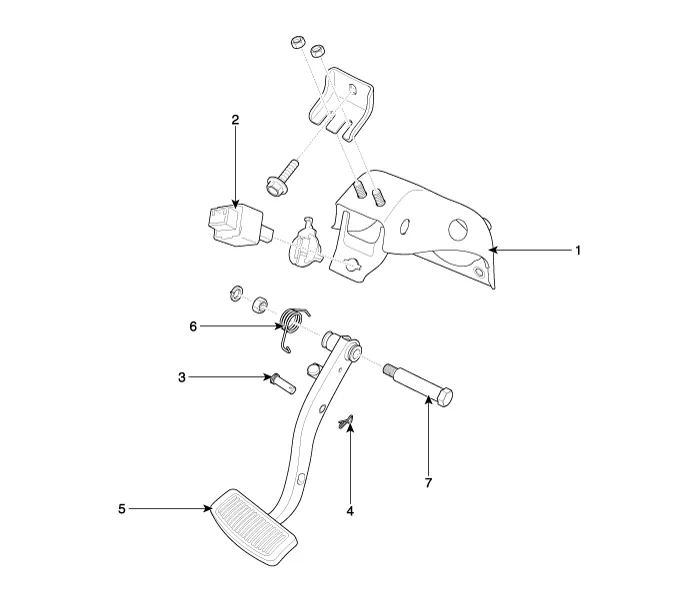
| 1. Brake pedal member assembly 2. Stop lamp switch 3. Clevis pin 4. Snap pin | 5. Brake pedal stopper 6. Return spring 7. Bolt |
Removal 1. Remove the rear wheel & tire. Tightening torque: 88.3 ~ 107.9 N.m (9.0 ~ 11.0 kgf.m, 65.1 ~ 79.6 lb-ft) 2. Loosen the guide rod bolt (B) and pivot the caliper up out of the way.
Description The stop lamp switch plays the role of supplying signals to turn on stop lamps and convenience devices (HECU, ECU, BCM, SML, etc.). The stop lamp switch is a system for drivers to express their intention to the brake by press the brake pedal.
Other information:
Hyundai Genesis (DH) 2013-2016 Service Manual: Start/Stop Button Repair procedures
Removal 1. Disconnect the negative(-) battery terminal. 2. Remove the driver crash pad lower panel. (Refer to Body - "Crash Pad Lower Panel") 3. Remove the start/stop button (A) from the center fascia garnish after loosening the mounting clip.
Hyundai Genesis (DH) 2013-2016 Service Manual: PGS Unit (Back & Blinde Unit) Repair procedures
Removal 1. Disconnect the negative (-) battery terminal. 2. Remove the glove box housing (A). (Refer to Body - "Glove Box") 3. Remove the PGS unit (A) after loosening the nuts. Installation 1. Install the PGS unit. 2. Install the glove box housing.
Categories
- Manuals Home
- Hyundai Genesis Owners Manual
- Hyundai Genesis Service Manual
- Body Electrical System
- Body (Interior and Exterior)
- Front Door
- New on site
- Most important about car
