
Hyundai Genesis (DH): Power Windows / Power Window Switch Components and Components Location
Hyundai Genesis (DH) 2013-2016 Service Manual / Body Electrical System / Power Windows / Power Window Switch Components and Components Location
| Components |
| Driver Power Window Switch |

| Assist Power Window Switch |
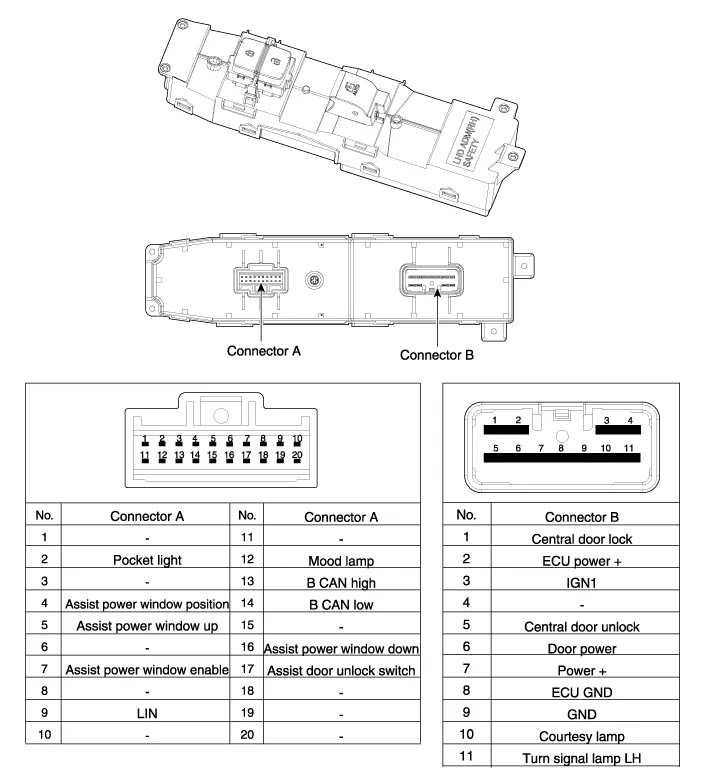
| Rear Power Window Switch |
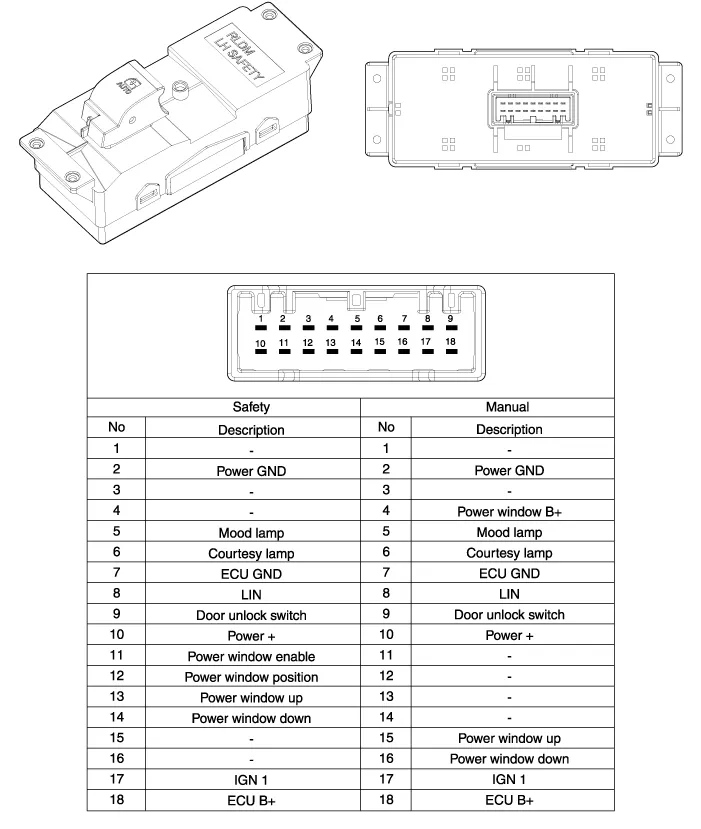
Inspection
Circuit Diagram Driver Power Window Switch Assist Power Window Switch Rear Power Window Switch
Other information:
Hyundai Genesis (DH) 2013-2016 Service Manual: Components and Components Location
C
Hyundai Genesis (DH) 2013-2016 Service Manual: Photo Sensor Repair procedures
Inspection 1. Turn the ignition switch ON. 2. Connect the GDS. 3. Emit intensive light toward the photo sensor using a lamp, and check the output voltage change. 4. The voltage will rise with higher intensive light and fall with lower intensive light.
Categories
- Manuals Home
- Hyundai Genesis Owners Manual
- Hyundai Genesis Service Manual
- Smart Cruise Control Unit Repair procedures
- Heating, Ventilation and Air Conditioning
- Steering System
- New on site
- Most important about car

Copyright В© 2026 www.hgenesisdh.com - 0.0288