
Hyundai Genesis (DH): Parking Guide System (PGS) / PGS Unit (Back & Blinde Unit) Schematic Diagrams
| Circuit Diagram |
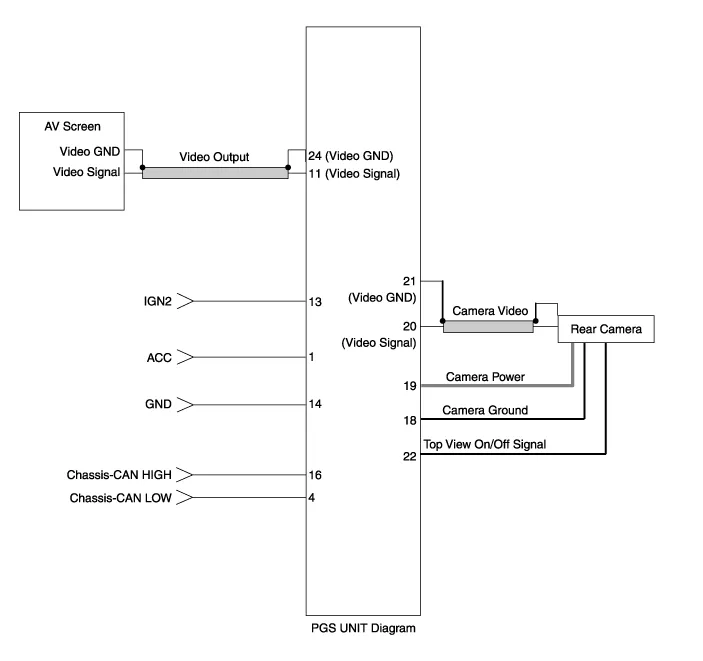
| No. | Signal | Description | level |
| 1 | ACC | ACC | OFF(Less than 1V), ON(More than 8V) |
| 4 | C-CAN-L | High Speed CAN low | - |
| 11 | V-OUT | Video Out | - |
| 13 | IGN | IGN Signal | ON(More than 9V) / OFF(Less than 1V) |
| 16 | C-CAN-H | High Speed CAN high | - |
| 18 | GND-R | Rear Camera GND | - |
| 19 | REAR-POWER | VCC-REAR | ON(6~7V) / OFF(Less than 1V) |
| 20 | V-IN-R | Rear Video Input | - |
| 20 | VGND-R | Rear Video Gnd | - |
| 22 | SERIAL LINE | Top View Control | - |
| 24 | VGND | Video Out GND | - |
Removal 1. Disconnect the negative (-) battery terminal. 2. Remove the glove box housing (A). (Refer to Body - "Glove Box") 3. Remove the PGS unit (A) after loosening the nuts.
Other information:
Hyundai Genesis (DH) 2013-2016 Service Manual: Description and Operation
Description Integrated Rain Sensor Integrated rain sensor (A) controls three systems: front wiper, auto-light, and central air conditioner. 1. Wiper Control System When "AUTO" switch signal is received from the multi-function switch on the right, the integrated rain sensor detects the amount of rainfall.
Hyundai Genesis (DH) 2013-2016 Service Manual: Climate Control Air Filter Repair procedures
Replacement 1. Remove both stoppers (B) by turning them from the glove box (A). 2. Disconnect the air damper (A) from the glove box (B). 3. Remove the filter cover (A) by pressing the knob. 4. Replace the air filter (A) with a new one according to the direction of air filter.
Categories
- Manuals Home
- Hyundai Genesis Owners Manual
- Hyundai Genesis Service Manual
- Active Air Flap(AAF) Repair procedures
- Electric Parking Brake (EPB) Repair procedures
- Engine Electrical System
- New on site
- Most important about car
