
Hyundai Genesis (DH): Lubrication System / Oil Pan Components and Components Location
Hyundai Genesis (DH) 2013-2016 Service Manual / Engine Mechanical System / Lubrication System / Oil Pan Components and Components Location
| Components |
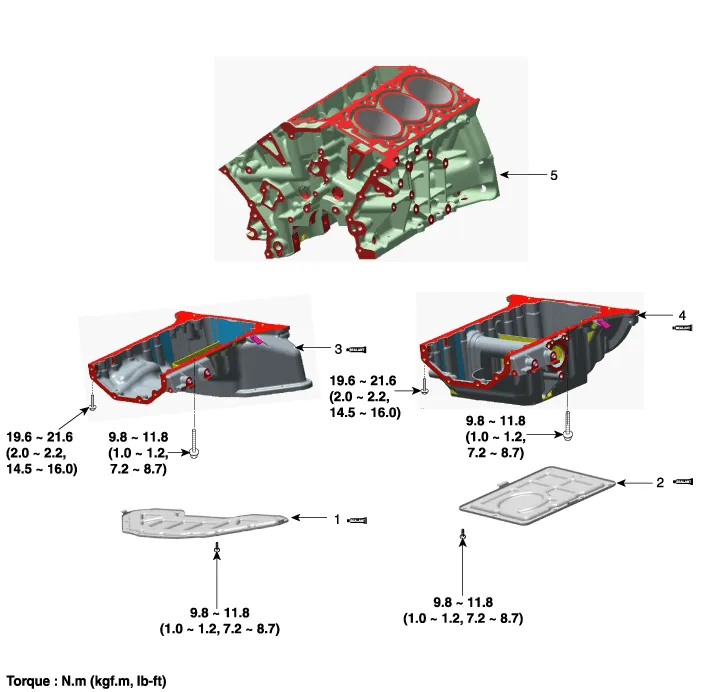
| 1. 2WD Lower oil pan 2. AWD Lower oil pan | 3. 2WD Upper oil pan 4. AWD Upper oil pan 5. Cylinder block |
Removal and Installation Oil filter body 1. Disconnect the battery "-" terminal from the trunk room. 2. Remove the engine under cover. (Refer to Engine And Transaxle Assembly - "Engine Room Under Cover") 3.
Removal [Lower oil pan] 1. Disconnect the battery "-" terminal from the trunk room. 2. Remove the engine under cover. (Refer to Engine And Transaxle Assembly - "Engine Room Under Cover") 3.
Other information:
Hyundai Genesis (DH) 2013-2016 Service Manual: Description and Operation
System Overview RPAS (Rear Parking Assist System) is an electronic driving aid that warns the driver to be cautious while parking or driving at low speed. The sensor uses ultrasonic waves to detect objects within proximity of the vehicle. RPAS consists of four RPS sensors which are detecting the obstacles and transmit the result separat
Hyundai Genesis (DH) 2013-2016 Service Manual: Compressor Components and Components Location
C
Categories
- Manuals Home
- Hyundai Genesis Owners Manual
- Hyundai Genesis Service Manual
- General Information
- Emission Control System
- Starter Repair procedures
- New on site
- Most important about car

Copyright В© 2026 www.hgenesisdh.com - 0.0331