
Hyundai Genesis (DH): Automatic Transmission Control System / Shift Cable Repair procedures
Hyundai Genesis (DH) 2013-2016 Service Manual / Automatic Transmission System (SBC) / Automatic Transmission Control System / Shift Cable Repair procedures
| Removal |
| 1. |
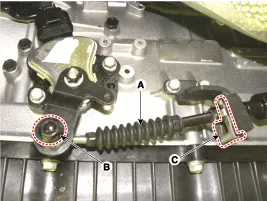
Remove the nut (B) and clip (C). |
| 2. |
Remove the shift cable (A) assembly from the transmission.
|
| 3. |
Remove the floor console.
(Refer to Body-"Floor Console") |
| 4. |
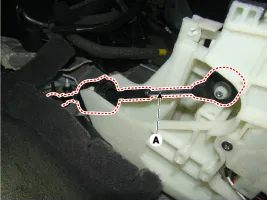
Disconnect the shift cable (A) from the shift lever.
|
| 5. |
Remove the shift cable assembly (B) by removing the nuts (A).
|

| 6. |
Pull the rubber plug from the floor and pull out the shift cable assembly.
|
| Installation |
| 1. |
To install, reverse the removal procedure. |
| Adjustment |
| How to Adjust Shift Cable |
| 1. |
Insert the shift cable to the bracket and hold it with a new clip. |
| 2. |
Align the manual lever hole to the hole on the transmission case and hold the position with a bar. |
| 3. |
Eliminate shift cable free play of the shift cable. |
| 4. |
Firmly hold the special bolt with a wrench and tighten the nut(A) to the specified torque.
|

| 5. |
Take off the bar holding the manual lever. |
| 6. |
Shifting each position, check if the shift lever moves smoothly. |
Components 1. Shift lever knob2. Shift lever boots3. Shift lever assembly4. Shift cable
Other information:
Hyundai Genesis (DH) 2013-2016 Service Manual: Blind Spot Detection Unit Repair procedures
Removal 1. Disconnect the negative (-) battery terminal. 2. Remove the rear bumper. (Refer to Body - "Rear Bumper") 3. Remove the BSD unit (A) after loosening the mounting nuts. Take care not to separate the bracket from rear bumper when removing the BSD sensor.
Hyundai Genesis (DH) 2013-2016 Service Manual: In-car Sensor Repair procedures
I
Categories
- Manuals Home
- Hyundai Genesis Owners Manual
- Hyundai Genesis Service Manual
- Components and Components Location
- Engine Mechanical System
- Repair procedures
- New on site
- Most important about car

Copyright В© 2026 www.hgenesisdh.com - 0.0319