
Hyundai Genesis (DH): Rear Suspension System / Rear Upper Arm Repair procedures
Hyundai Genesis (DH) 2013-2016 Service Manual / Suspension System / Rear Suspension System / Rear Upper Arm Repair procedures
| Removal |
| 1. |
Loosen the wheel nuts slightly. Raise the vehicle, and make sure it is securely supported. |
| 2. |
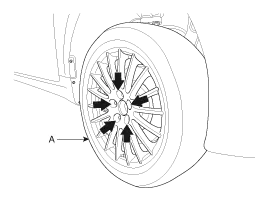
Remove the front wheel and tire (A) from the rear hub.
|

| 3. |
Support the lower portion of the rear axle with a jack securely. |
| 4. |
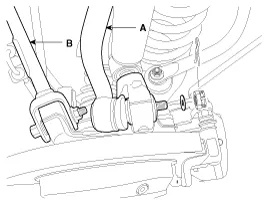
Loosen the mounting bolts and then remove the rear upper arm front (B) & rear upper arm rear (A).
|
| 5. |
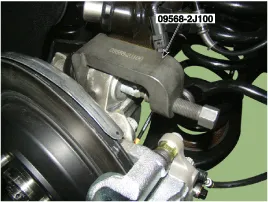
Loosen the flange bolt & nuts and then rear upper rear arm (A).
|
| 6. |
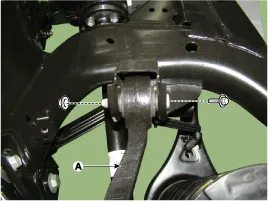
Loosen the flange bolt & nuts (A) and then rear upper front arm.
|
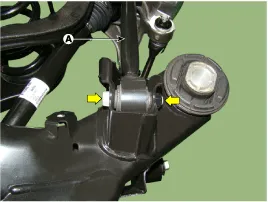
| 7. |
Installation in the reverse order of removal. |
| 8. |
Check the alignment.
(Refer to Tires/Wheels - "Alignment") |
| Inspection |
| 1. |
Check the bushing for wear and deterioration. |
| 2. |
Check the ball joint for rotating torque. |
Removal 1. Loosen the wheel nuts slightly. Raise the vehicle, and make sure it is securely supported. 2. Remove the front wheel and tire (A) from the rear hub.
Removal 1. Loosen the wheel nuts slightly. Raise the vehicle, and make sure it is securely supported. 2. Remove the front wheel and tire (A) from the rear hub.
Other information:
Hyundai Genesis (DH) 2013-2016 Service Manual: Compressor Components and Components Location
C
Hyundai Genesis (DH) 2013-2016 Service Manual: Auto Defogging Actuator Repair procedures
Inspection 1. Turn the ignition switch OFF. 2. Disconnect the auto defogging connector. 3. Verify that the auto defogging actuator operates to the open position when connecting 12V to terminal 3 and grounding terminal 4. Verify that the auto defogging actuator operates to the close position when connected in reverse.
Categories
- Manuals Home
- Hyundai Genesis Owners Manual
- Hyundai Genesis Service Manual
- Description and Operation
- Suspension System
- Brake System
- New on site
- Most important about car

Copyright В© 2026 www.hgenesisdh.com - 0.0284