
Hyundai Genesis (DH): Lighting System / Overhead Console Lamp Repair procedures
| Inspection |
| 1. |
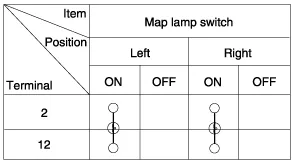
Remove the overhead console lamp assembly and check for
continuity between terminals. If the continuity is not as specified,
replace the map lamp switch.
|

| Removal |
| 1. |
Disconnect the negative (-) battery terminal. |
| 2. |
Remove the mounting screws (2EA).
And then remove the overhead console (A).
|
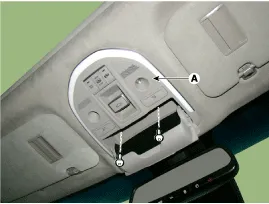
| 3. |
Remove the overhead console after disconnecting the connector (A).
|

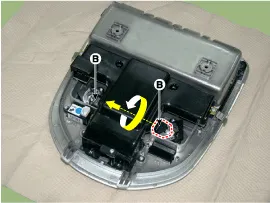
| 4. |
Remove the overhead console lamp (B) by turning the socket.
|
| Installation |
| 1. |
Install the overhead console lamp after connecting the connector. |
| 2. |
Install the lens after tightening 2 screws. |
Removal 1. Disconnect the negative (-) battery terminal. 2. Separate the room lamp (B) from the roof trim after disengaging the mounting clip (A).
Removal 1. Disconnect the negative (-) battery terminal. 2. Remove the front door trim. (Refer to Body - "Front Door Trim") 3. Disconnect the door mood lamp connectors (A).
Other information:
Hyundai Genesis (DH) 2013-2016 Service Manual: Compressor Repair procedures
Removal 1. If the compressor is marginally operable, run the engine at idle speed, and let the air conditioning work for a few minutes, then shut the engine off. 2. Disconnect the negative (-) battery terminal. 3. Remove the engine room cover.
Hyundai Genesis (DH) 2013-2016 Service Manual: Auto Defogging Actuator Repair procedures
Inspection 1. Turn the ignition switch OFF. 2. Disconnect the auto defogging connector. 3. Verify that the auto defogging actuator operates to the open position when connecting 12V to terminal 3 and grounding terminal 4. Verify that the auto defogging actuator operates to the close position when connected in reverse.
Categories
- Manuals Home
- Hyundai Genesis Owners Manual
- Hyundai Genesis Service Manual
- General Information
- Components and Components Location
- Electric Parking Brake (EPB) Repair procedures
- New on site
- Most important about car
