
Hyundai Genesis (DH): Intake And Exhaust System / Muffler Repair procedures
Hyundai Genesis (DH) 2013-2016 Service Manual / Engine Mechanical System / Intake And Exhaust System / Muffler Repair procedures
| Removal and Installation |
LH Front Muffler
| 1. |
Disconnect the battery "-" terminal from the trunk room. |
| 2. |
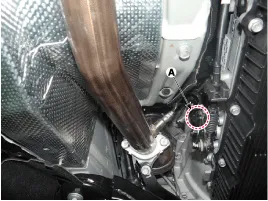
Disconnect the LH rear oxygen sensor connector (A).
|
| 3. |
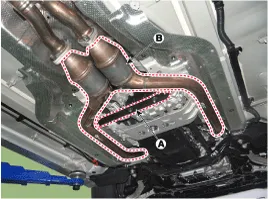
Remove the transmission stay bracket (A) and LH front muffler (B).
|
| 4. |
To install, reverse the removal procedure. |
RH Front Muffler
| 1. |
Disconnect the battery "-" terminal from the trunk room. |
| 2. |
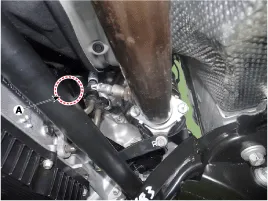
Disconnect the RH rear oxygen sensor connector (A).
|
| 3. |
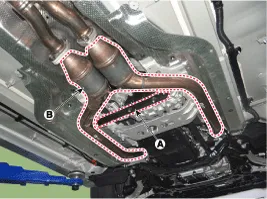
Remove the transmission stay bracket (A) and RH front muffler (B).
|
| 4. |
To install, reverse the removal procedure. |
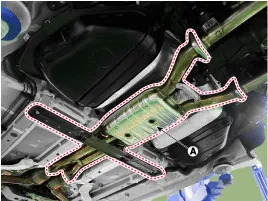
Center Muffler
| 1. |
Disconnect the battery "-" terminal from the trunk room. |
| 2. |
Remove the center muffler (A).
|
| 3. |
To install, reverse the removal procedure. |
LH Rear Muffler
| 1. |
Disconnect the battery "-" terminal from the trunk room. |
| 2. |
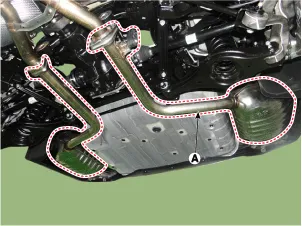
Remove the LH rear muffler (A).
|
| 3. |
To install, reverse the removal procedure. |
RH Rear Muffler
| 1. |
Disconnect the battery "-" terminal from the trunk room. |
| 2. |
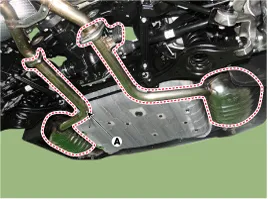
Remove the RH rear muffler (A).
|
| 3. |
To install, reverse the removal procedure. |
Components 1. Front muffler2. Center muffler3. Rear muffler4. Hanger5. Gasket
Other information:
Hyundai Genesis (DH) 2013-2016 Service Manual: Specifications
S
Hyundai Genesis (DH) 2013-2016 Service Manual: Heater Unit Components and Components Location
Component Location Components (1) 1. Shower duct (Left)2. Mode actuator (LH)3. Temperature control actuator (LH)4. Temperature door lever (Left)5. Mode actuator (A)6. Console temperature actuator (A)7. Console mode actuator ON/OFF8. Heater case (Left)9.
Categories
- Manuals Home
- Hyundai Genesis Owners Manual
- Hyundai Genesis Service Manual
- Engine Electrical System
- Brake System
- Active Air Flap(AAF) Repair procedures
- New on site
- Most important about car

Copyright В© 2026 www.hgenesisdh.com - 0.0264