
Hyundai Genesis (DH): Fuel Delivery System / Fuel Pump Control Module (FPCM) Schematic Diagrams
Hyundai Genesis (DH) 2013-2016 Service Manual / Engine Control / Fuel System / Fuel Delivery System / Fuel Pump Control Module (FPCM) Schematic Diagrams
| Circuit Diagram |
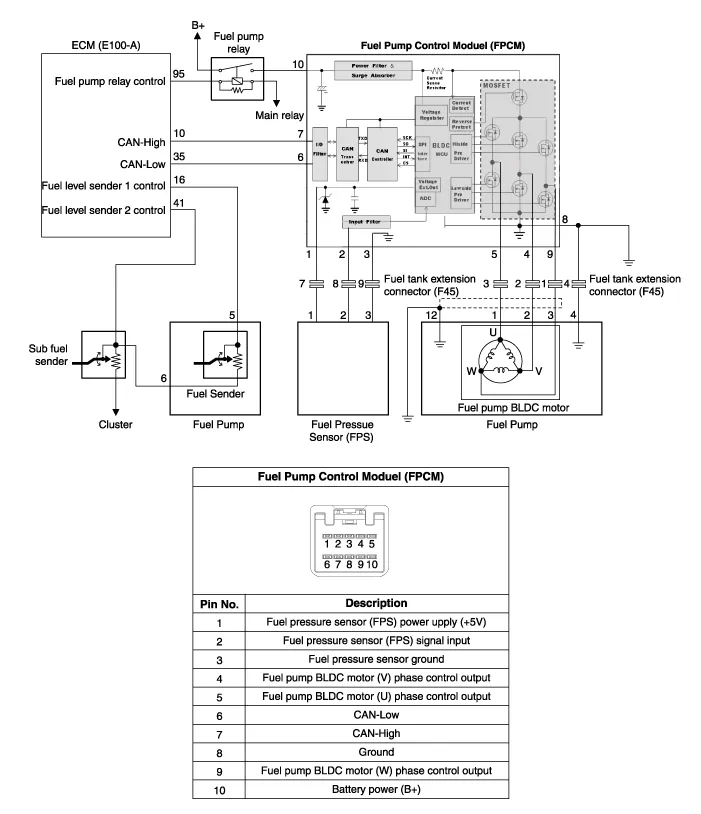
Specification ltemSpecificationSupply Voltage (V)8~18Supply Current (A)Max. 10Fuel Pressure (kpa)Starting600Drive350 ~ 500Stop20 Under
Inspection 1. Connect the GDS on the Data Link Connector (DLC). 2. If there is DTC on the GDS, replace the FPCM. 3. Check the output voltage of fuel pressure sensor (FPS).
Other information:
Hyundai Genesis (DH) 2013-2016 Service Manual: Description and Operation
Description System Overview The System offers the following features: - Changing the state of engine ignition and power by using the start button. - Controlling external relays for ACC / IGN1 / IGN2 terminal switching and STARTER, without use of mechanical ignition switch.
Hyundai Genesis (DH) 2013-2016 Service Manual: Description and Operation
D
Categories
- Manuals Home
- Hyundai Genesis Owners Manual
- Hyundai Genesis Service Manual
- Engine Electrical System
- Restraint
- Description and Operation
- New on site
- Most important about car

Copyright В© 2026 www.hgenesisdh.com - 0.0292