
Hyundai Genesis (DH): Fuel Delivery System / Fuel Line Repair procedures
| Removal |
| 1. |
Turn the ignition switch OFF and disconnect the negative (-) battery terminal. |
| 2. |
Release the residual pressure in fuel line.
(Refer to Fuel Delivery System - "Release Residual Pressure in Fuel Line") |
| 3. |
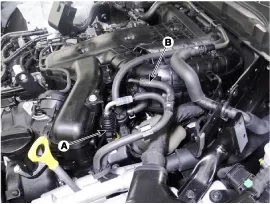
Disconnect the fuel feed tube quick-connector (A). |
| 4. |
Disconnect the vapor hose (B) which is connected to the PCSV.
|
| 5. |
Remove the front-LH wheel, tire and the inner wheel house. |
| 6. |
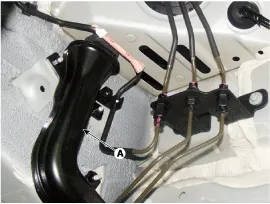
Remove the fuel line protector (A) after removing mounting nuts.
|
| 7. |
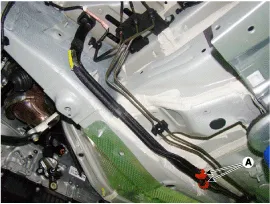
Disconnect the front vapor and fuel tube line quick-connector (A).
|
| 8. |
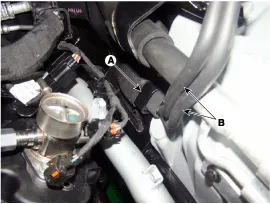
Remove the noise barrier (A) after loosening the mounting bolt and nut. |
| 9. |
Remove the front vapor and fuel tube line (B).
|
| 10. |
Remove the fuel tank.
(Refer to Fuel Delivery System - "Fuel Tank") |
| 11. |
Remove the vapor tube and fuel feed tube line fixing clips (A) by using a common driver.
|
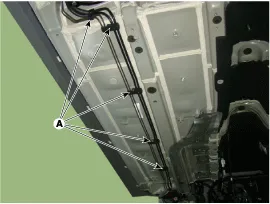
| 12. |
Remove the fuel line from the bottom of the vehicle.
|
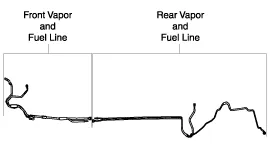
| Installation |
| 1. |
To install, reverse the removal procedure.
|
| Inspection |
| 1. |
Start the engine. |
| 2. |
Check the fuel feed line (A) installation state and fuel leakage state.
|
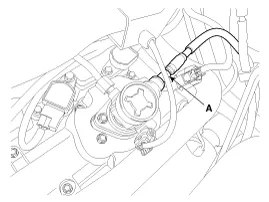
| 3. |
Fold the rear seat cushion. |
| 4. |
Remove the fuel pump service cover (A) after loosening the screws.
|
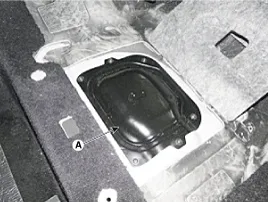
| 5. |
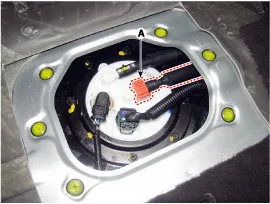
Check the fuel feed quick-connector (A) installation state and fuel leakage state.
|
| 6. |
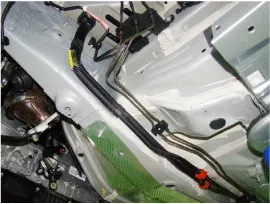
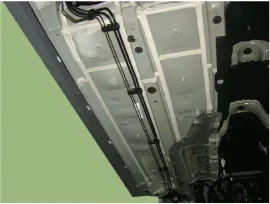
Lift the vehicle. |
| 7. |
Check the fuel leakage state.
|
| 8. |
Replace the fuel line after checking the abnormal fuel line.
(Refer to Fuel Delivery System - "Fuel Line") |
Inspection 1. Connect the GDS on the Data Link Connector (DLC). 2. Check the output voltage of fuel pressure sensor (FPS). Specification: Refer to
Removal 1. Remove the filler neck mounting screws (A) after opening the fuel filler door. 2. Remove the rear-left wheel & tire and wheel house cover.
Other information:
Hyundai Genesis (DH) 2013-2016 Service Manual: Auto Head Lamp Leveling Unit Repair procedures
Inspection 1. Ignition "ON". 2. Turn on the head lamp switch. 3. Check that the aim of the head lamp changes smoothly when the head lamp leveling device switch is turned on. 4. If it does not operate well, check the connector and terminals to make sure that they are connected.
Hyundai Genesis (DH) 2013-2016 Service Manual: Auto Defogging Actuator Description and Operation
Description The auto defogging sensor is installed on front window glass. The sensor judges and sends signal if moisture occurs to blow out wind for defogging. The air conditioner control module receives a signal from the sensor and restrains moisture and eliminates defog by the intake actuator, A/C, auto defogging actuator, blower motor
Categories
- Manuals Home
- Hyundai Genesis Owners Manual
- Hyundai Genesis Service Manual
- Description and Operation
- Description and Operation
- Description and Operation
- New on site
- Most important about car
