
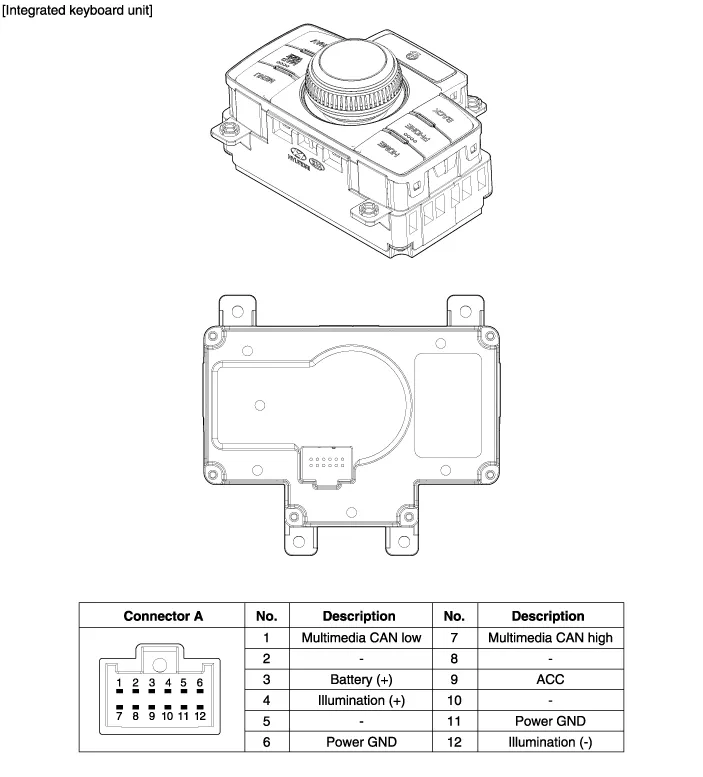
Hyundai Genesis (DH): Premium AVN System / Center Control Panel (CCP) Components and Components Location
Hyundai Genesis (DH) 2013-2016 Service Manual / Body Electrical System / Premium AVN System / Center Control Panel (CCP) Components and Components Location
| Components |
Removal 1. Disconnect the negative (-) battery terminal. 2. Open the trunk, remove the left trunk trim. (Refer to Body - "Trunk Trim") 3. Remove the external amplifier (C) after disconnecting the connector (A),(B) and loosening the mounting nuts.
Removal Front Keyboard Unit 1. Disconnect the negative (-) battery terminal. 2. Remove the floor console upper cover. (Refer to Body - "Floor Console Assembly") 3.
Other information:
Hyundai Genesis (DH) 2013-2016 Service Manual: Blind Spot Detection Unit Repair procedures
Removal 1. Disconnect the negative (-) battery terminal. 2. Remove the rear bumper. (Refer to Body - "Rear Bumper") 3. Remove the BSD unit (A) after loosening the mounting nuts. Take care not to separate the bracket from rear bumper when removing the BSD sensor.
Hyundai Genesis (DH) 2013-2016 Service Manual: PGS Unit (Back & Blinde Unit) Schematic Diagrams
C
Categories
- Manuals Home
- Hyundai Genesis Owners Manual
- Hyundai Genesis Service Manual
- General Information
- Electric Parking Brake (EPB) Repair procedures
- Evaporative Emission Control System
- New on site
- Most important about car

Copyright В© 2026 www.hgenesisdh.com - 0.0279