
Hyundai Genesis (DH): Premium AVN System / Center Control Panel (CCP) Repair procedures
Hyundai Genesis (DH) 2013-2016 Service Manual / Body Electrical System / Premium AVN System / Center Control Panel (CCP) Repair procedures
| Removal |
Front Keyboard Unit
| 1. |
Disconnect the negative (-) battery terminal. |
| 2. |
Remove the floor console upper cover.
(Refer to Body - "Floor Console Assembly") |
| 3. |
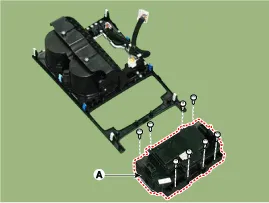
Remove the front keyboard unit (A) after loosening the mounting screws.
|
Components 1. Left Top Remote Control Switch(Audio)2. Right Top Remote Control Switch(Cruise+Trip Computer)
Other information:
Hyundai Genesis (DH) 2013-2016 Service Manual: Photo Sensor Description and Operation
Description The photo sensor is located in the right side of the inside rearview mirror. he integrated rain sensor is located in the right side of the inside rearview mirror. The integrated rain sensor is a multifunctional sensor which combines the photo sensor and auto light sensor, and has a built-in photovoltaic diode (for detecting t
Hyundai Genesis (DH) 2013-2016 Service Manual: Heater & A/C Control Unit Repair procedures
Self Diagnosis 1. Self-diagnosis process 2. How to read self-diagnostic code After the display panel blinks three times every 0.5 second, the corresponding fault code blinks on the setup temperature display panel every 0.5 second and will show two figures.
Categories
- Manuals Home
- Hyundai Genesis Owners Manual
- Hyundai Genesis Service Manual
- Transmission Control Module (TCM) Repair procedures
- Active Air Flap(AAF) Repair procedures
- Brake System
- New on site
- Most important about car

Copyright В© 2026 www.hgenesisdh.com - 0.0279