
Hyundai Genesis (DH): Brake System / Brake Pedal Repair procedures
| Removal |
| 1. |
Turn ignition switch OFF and disconnect the negative (-) battery cable. |
| 2. |
Remove the crash pad lower panel.
(Refer to Body - "Crash Pad Lower Panel") |
| 3. |
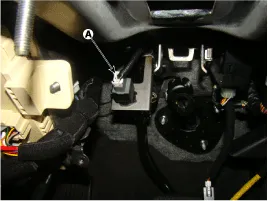
Disconnect the stop lamp switch connector (A).
|
| 4. |
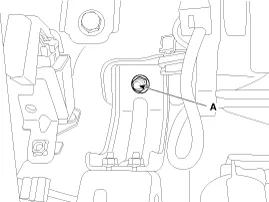
Remove the brake pedal member mounting nut (A).
|
| 5. |
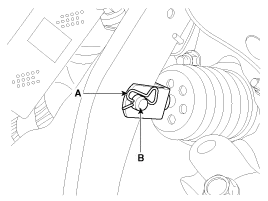
Remove the snap pin (A) and clevis pin (B).
|
| 6. |
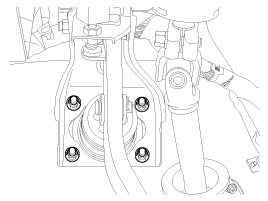
Remove the brake pedal member assembly mounting nuts and then remove the brake pedal assembly.
|
| Inspection |
| 1. |
Check the bushing for wear. |
| 2. |
Check the brake pedal for bending or twisting. |
| 3. |
Check the brake pedal return spring for damage. |
| 4. |
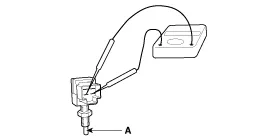
Check the stop lamp switch.
|
| Installation |
| 1. |
To install, reverse the removal procedure. |
| 2. |
Adjust the brake pedal height and free play. |
| 3. |
Check the brake pedal operation after installing the brake pedal. |
Components 1. Brake pedal member assembly2. Stop lamp switch3. Clevis pin4. Snap pin5. Brake pedal stopper6. Return spring7. Bolt
Components 1. Caliper body2. Guide pin3. Locking pin4. Brake pad5. Cover plate 6. Pad spring7. Bleed screw
Other information:
Hyundai Genesis (DH) 2013-2016 Service Manual: Description and Operation
System Overview RPAS (Rear Parking Assist System) is an electronic driving aid that warns the driver to be cautious while parking or driving at low speed. The sensor uses ultrasonic waves to detect objects within proximity of the vehicle. RPAS consists of four RPS sensors which are detecting the obstacles and transmit the result separat
Hyundai Genesis (DH) 2013-2016 Service Manual: Description and Operation
Description System Overview The System offers the following features: - Changing the state of engine ignition and power by using the start button. - Controlling external relays for ACC / IGN1 / IGN2 terminal switching and STARTER, without use of mechanical ignition switch.
Categories
- Manuals Home
- Hyundai Genesis Owners Manual
- Hyundai Genesis Service Manual
- Body (Interior and Exterior)
- Description and Operation
- General Information
- New on site
- Most important about car
