
Hyundai Genesis (DH): Charging System / Battery Troubleshooting
Hyundai Genesis (DH) 2013-2016 Service Manual / Engine Electrical System / Charging System / Battery Troubleshooting
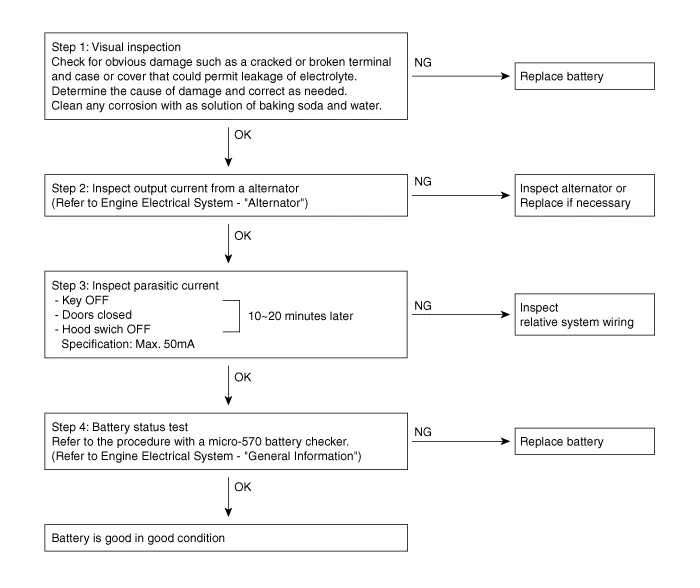
| Troubleshooting |
Removal 1. Disconnect the battery sensor connector (A), battery negative terminal (B) and positive terminal (C). 2. Disconnect the vent hose connector (A) from the battery air vent hole.
Description Vehicles have many control units that need large amounts of electricity. These units control their own system based on information from diverse sensors.
Other information:
Hyundai Genesis (DH) 2013-2016 Service Manual: Specifications
S
Hyundai Genesis (DH) 2013-2016 Service Manual: Photo Sensor Description and Operation
Description The photo sensor is located in the right side of the inside rearview mirror. he integrated rain sensor is located in the right side of the inside rearview mirror. The integrated rain sensor is a multifunctional sensor which combines the photo sensor and auto light sensor, and has a built-in photovoltaic diode (for detecting t
Categories
- Manuals Home
- Hyundai Genesis Owners Manual
- Hyundai Genesis Service Manual
- Body Electrical System
- Transmission Control Module (TCM) Repair procedures
- Brake System
- New on site
- Most important about car

Copyright В© 2026 www.hgenesisdh.com - 0.0294