Hyundai Genesis (DH): Charging System / Battery Repair procedures

Removal
1.
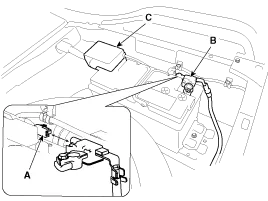
Disconnect the battery sensor connector (A), battery negative terminal (B) and positive terminal (C).

2.
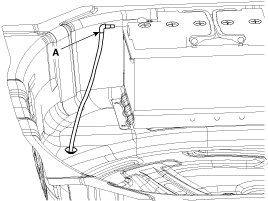
Disconnect the vent hose connector (A) from the battery air vent hole.

3.
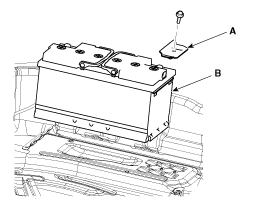
Remove the mounting bracket (A) and then remove the battery (B).

Installation
1.
Install in the reverse order of removal.

Battery (-)terminal installation:
4.0 ~ 6.0 N.m (0.4 ~ 0.6 kgf.m, 3.0 ~ 4.4 lb-ft)
Battery (+)terminal installation:
7.8 ~ 9.8 N.m (0.8 ~ 1.0 kgf.m, 5.8 ~ 7.2 lb-ft)
Battery mounting bracket and the insulation pad installation:
8.8 ~ 13.7 N.m (0.9 ~ 1.4 kgf.m, 6.5 ~ 10.1 Ib-ft)


    Specifications ?AGM105L-DIN ItemSpecificationModel typeAGM105L-DIN Cold Cranking Amperage (A)950 (SAE) / 760 (EN) Reserve Capacity (Min)190

    Troubleshooting

    Other information:

    Hyundai Genesis (DH) 2013-2016 Service Manual: Head Up Display Unit Repair procedures

    Removal 1. Disconnect the negative (-) battery terminal. 2. Remove the head up display bezel (A). 3. Remove the instrument cluster. (Refer to Indicators And Guages - "Instrument Cluster") 4. Remove the head up display unit bracket (A) after loosening the mounting nuts.

    Hyundai Genesis (DH) 2013-2016 Service Manual: Console Temperature Control Actuator Repair procedures

    Inspection 1. Turn the ignition switch OFF. 2. Disconnect the console temperature control actuator connector. 3. Verify that the console temperature control actuator operates to the defrost mode when connecting 12V to terminal 3 and grounding terminal 4.

    Categories

     
    Copyright В© 2026 www.hgenesisdh.com - 0.0255