
Hyundai Genesis (DH): Charging System / Battery Sensor Description and Operation
| Description |
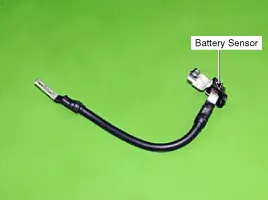
When battery sensor signal fault occurs, check whether the
parasitic draw is not abnormal (Refer to vehicle parasitic current
inspection) |

It takes a few hours for a new battery sensor to detect the battery state correctly.
Perform the following process after replacing the battery sensor.
|

For the vehicle equipped with a battery sensor, be careful
not to damage the battery sensor when the battery is replaced or
recharged.
Troubleshooting Removal 1. Disconnect the battery negative (-) cable. 2. Disconnect the battery sensor connector (A). 3. Remove the battery negative (-) cable after removing the bolts (B). Other information:Hyundai Genesis (DH) 2013-2016 Service Manual: High Mounted Stop Lamp Repair proceduresRemoval High Mounted Stop Lamp 1. Disconnect the negative (-) battery terminal. 2. Remove the roof trim assembly. (Refer to Body - "Roof Trim") 3. Remove the high mounted stop lamp assembly (A) after loosening the mounting screws. Installation 1. Hyundai Genesis (DH) 2013-2016 Service Manual: General Safety Information and CautionInstructions When Handling Refrigerant 1. R-134a liquid refrigerant is highly volatile. A drop on the skin of your hand could result in localized frostbite. When handling the refrigerant, be sure to wear gloves. 2. It is standard practice to wear goggles or glasses to protect your eyes, and gloves to protect your hands. Categories

Copyright В© 2026 www.hgenesisdh.com - 0.0283
|