
Hyundai Genesis (DH): Lighting System / High Mounted Stop Lamp Repair procedures
| Removal |
| High Mounted Stop Lamp |
| 1. |
Disconnect the negative (-) battery terminal. |
| 2. |
Remove the roof trim assembly.
(Refer to Body - "Roof Trim") |
| 3. |
Remove the high mounted stop lamp assembly (A) after loosening the mounting screws.
|
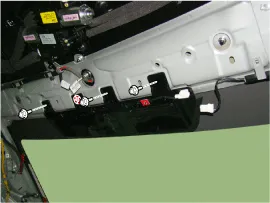
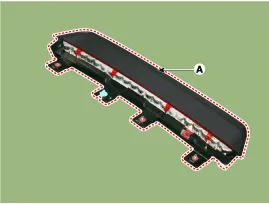
| Installation |
| 1. |
Install the high mounted stop lamp. |
| 2. |
Install the roof trim assembly. |
| 3. |
Connect the negative (-) battery terminal. |
Removal 1. Disconnect the negative (-) battery terminal. 2. Remove the trunk lid panel. (Refer to Body - "Trunk Lid Back Panel") 3. Remove the license lamp after disengaging the license lamp mounting clip (A) 4.
Removal 1. Disconnect the negative (-) battery terminal. 2. After loosening the nuts (4EA) holding the rear combination lamp and disconnecting the connector (A), remove the outside rear combination lamp assembly.
Other information:
Hyundai Genesis (DH) 2013-2016 Service Manual: Components and Components Location
C
Hyundai Genesis (DH) 2013-2016 Service Manual: In-car Sensor Description and Operation
Description An in-car air temperature sensor is located in the crash pad lower panel. The sensor contains a thermistor which measures the temperature of the cabin. The signal determined by the resistance value which changes in accordance with perceived inside temperature, is delivered to the heater control unit and according to this signa
Categories
- Manuals Home
- Hyundai Genesis Owners Manual
- Hyundai Genesis Service Manual
- Suspension System
- Engine Mechanical System
- Body Electrical System
- New on site
- Most important about car
