Hyundai Genesis (DH): Front Door / Front Door Outside Handle Repair procedures

Replacement
1.
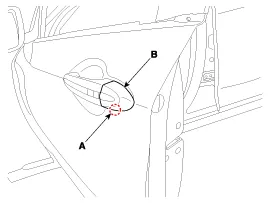
Remove the handle cover (B) by pushing the button (A) located in the lower part of the handle cover using a key or flat head screwdriver.

2.
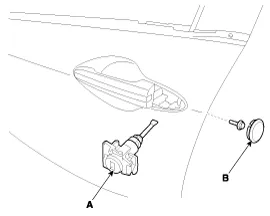
Remove the plug hole (B).
3.
After loosening the mounting bolt, remove the front door lock (A).

Tightening torque :
6.9 ~ 10.8 N.m (0.7 ~ 1.1 kgf.m, 5.1 ~ 8.0 lb-ft)

4.
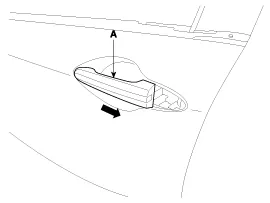
Remove the front door outside handle (A) by sliding it forward.

5.
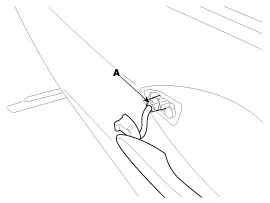
Disconnect the front door outside handle connector (A).

6.
Install in the reverse order of removal.
   

    Component Location 1. Front door outside handle

    Replacement 1. Pull down the front door window glass to the lowest level by pressing the power window glass switch. 2. After loosening the mounting screws, remove the front door belt outside weatherstrip (A).

    Other information:

    Hyundai Genesis (DH) 2013-2016 Service Manual: Auto Light Sensor Repair procedures

    Removal 1. Disconnect the negative (-) battery terminal. 2. Remove the photo & auto light sensor. (Refer to Windshield Wiper/Washer - "Rain Sensor") Installation 1. Install the auto light sensor. 2. Connect the negative (-) battery terminal.

    Hyundai Genesis (DH) 2013-2016 Service Manual: Parking Assist Sensor Repair procedures

    Removal 1. Disconnect the negative (-) battery terminal. 2. Remove the front/rear bumper cover. (Refer to Body - "Front Bumper Cover") (Refer to Body - "Rear Bumper Cover") 3. Disconnect the connector (B) from the parking assist sensor (A).

    Categories

     
    Copyright В© 2026 www.hgenesisdh.com - 0.0259