
Hyundai Genesis (DH): Premium AVN System / Center Control Panel (CCP) Components and Components Location
Hyundai Genesis (DH) 2013-2016 Service Manual / Body Electrical System / Premium AVN System / Center Control Panel (CCP) Components and Components Location
| Components |
Removal 1. Disconnect the negative (-) battery terminal. 2. Open the trunk, remove the left trunk trim. (Refer to Body - "Trunk Trim") 3. Remove the external amplifier (C) after disconnecting the connector (A),(B) and loosening the mounting nuts.
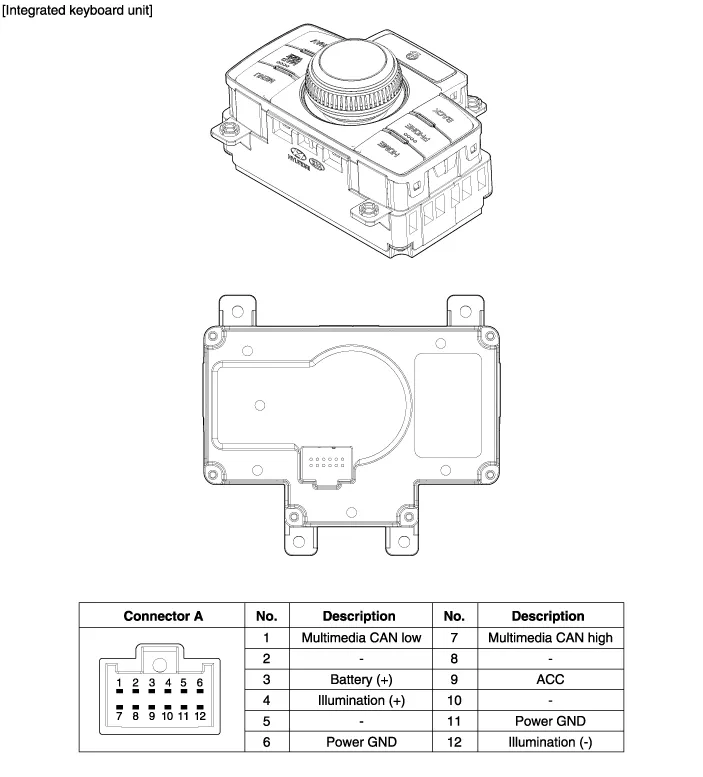
Removal Front Keyboard Unit 1. Disconnect the negative (-) battery terminal. 2. Remove the floor console upper cover. (Refer to Body - "Floor Console Assembly") 3.
Categories
- Manuals Home
- Hyundai Genesis Owners Manual
- Hyundai Genesis Service Manual
- 4 Wheel Drive (AWD) System
- Engine Electrical System
- Repair procedures
- New on site
- Most important about car

Copyright В© 2026 www.hgenesisdh.com - 0.0475