
Hyundai Genesis (DH): BLUE LINK / BLUE LINK Unit(I-BOX) Components and Components Location
| Component |
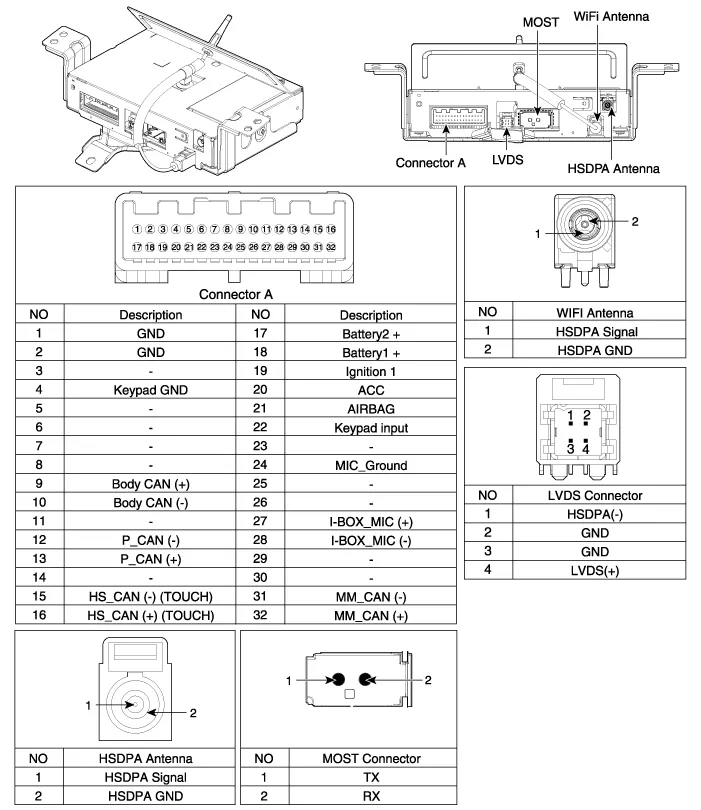
Description Vehicle information systems (BLUE LINK) based on state-of-the-art IT systems, safety and security The term "Telematics" is a combination of telecommunication and informatics.
Removal 1. Remove the battery(-) terminals. 2. Remove the AVN monitor. (Body - "Premium AVN System" ) 3. Disconnect the cables and connectors (A) from the MTS unit.
Other information:
Hyundai Genesis (DH) 2013-2016 Service Manual: High Mounted Stop Lamp Repair procedures
Removal High Mounted Stop Lamp 1. Disconnect the negative (-) battery terminal. 2. Remove the roof trim assembly. (Refer to Body - "Roof Trim") 3. Remove the high mounted stop lamp assembly (A) after loosening the mounting screws. Installation 1.
Hyundai Genesis (DH) 2013-2016 Service Manual: Ambient Temperature Sensor Description and Operation
Description The ambient temperature sensor is located inside the side mirror and detects ambient air temperature. It is a negative type thermistor; resistance will increase with lower temperature, and decrease with higher temperature. The sensor output will be used for discharge temperature control, temperature regulation door control,
Categories
- Manuals Home
- Hyundai Genesis Owners Manual
- Hyundai Genesis Service Manual
- Description and Operation
- Engine Electrical System
- Components and Components Location
- New on site
- Most important about car
