
Hyundai Genesis (DH): Charging System / Battery Troubleshooting
Hyundai Genesis (DH) 2013-2016 Service Manual / Engine Electrical System / Charging System / Battery Troubleshooting
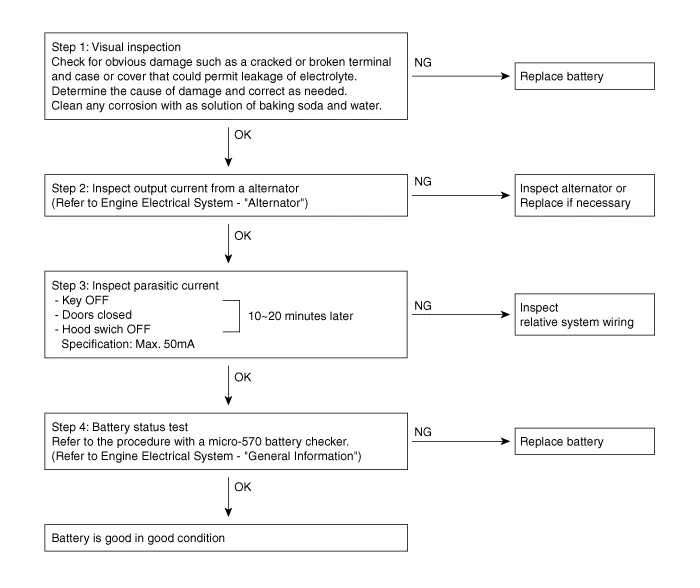
| Troubleshooting |
Removal 1. Disconnect the battery sensor connector (A), battery negative terminal (B) and positive terminal (C). 2. Disconnect the vent hose connector (A) from the battery air vent hole.
Description Vehicles have many control units that need large amounts of electricity. These units control their own system based on information from diverse sensors.
Other information:
Hyundai Genesis (DH) 2013-2016 Service Manual: Components and Components Location
S
Hyundai Genesis (DH) 2013-2016 Service Manual: Blower Motor Repair procedures
Inspection 1. Connect the battery voltage and check the blower motor rotation. 2. If the blower motor does not operate well, replace it with a genuine blower motor check for proper operation. 3. Replace the blower motor if it is proved that there is a problem with it.
Categories
- Manuals Home
- Hyundai Genesis Owners Manual
- Hyundai Genesis Service Manual
- General Information
- Brake System
- Active Air Flap(AAF) Repair procedures
- New on site
- Most important about car

Copyright В© 2026 www.hgenesisdh.com - 0.0342