Hyundai Genesis (DH): Charging System / Battery Repair procedures

Removal
1.
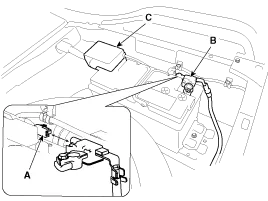
Disconnect the battery sensor connector (A), battery negative terminal (B) and positive terminal (C).

2.
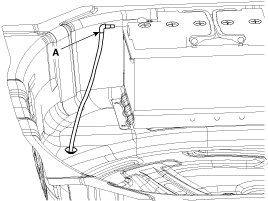
Disconnect the vent hose connector (A) from the battery air vent hole.

3.
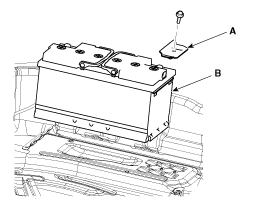
Remove the mounting bracket (A) and then remove the battery (B).

Installation
1.
Install in the reverse order of removal.

Battery (-)terminal installation:
4.0 ~ 6.0 N.m (0.4 ~ 0.6 kgf.m, 3.0 ~ 4.4 lb-ft)
Battery (+)terminal installation:
7.8 ~ 9.8 N.m (0.8 ~ 1.0 kgf.m, 5.8 ~ 7.2 lb-ft)
Battery mounting bracket and the insulation pad installation:
8.8 ~ 13.7 N.m (0.9 ~ 1.4 kgf.m, 6.5 ~ 10.1 Ib-ft)


    Specifications ?AGM105L-DIN ItemSpecificationModel typeAGM105L-DIN Cold Cranking Amperage (A)950 (SAE) / 760 (EN) Reserve Capacity (Min)190

    Troubleshooting

    Other information:

    Hyundai Genesis (DH) 2013-2016 Service Manual: Blind Spot Detection Indicator Repair procedures

    Removal Blind Spot Detection Warning Indicator 1. Disconnect the negative (-) battery terminal. 2. Remove the mirror (A). Installation Blind Spot Detection Warning Indicator 1. Install the outside mirror. 2. Connect the negative (-) battery terminal.

    Hyundai Genesis (DH) 2013-2016 Service Manual: Condenser Repair procedures

    Inspection 1. Check the condenser fins for clogging and damage. If they are clogged, clean them with water, and blow them with compressed air. If they are bent, gently bend them using a screwdriver or pliers. 2. Check the condenser connections for leakage, and repair or replace it, if required.

    Categories

     
    Copyright В© 2026 www.hgenesisdh.com - 0.0224