
Hyundai Genesis (DH): Charging System / Battery Sensor Repair procedures
Hyundai Genesis (DH) 2013-2016 Service Manual / Engine Electrical System / Charging System / Battery Sensor Repair procedures
| Removal |
| 1. |
Disconnect the battery negative (-) cable. |
| 2. |
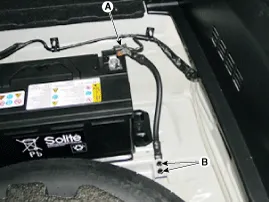
Disconnect the battery sensor connector (A). |
| 3. |
Remove the battery negative (-) cable after removing the bolts (B).
|
| Installation |
| 1. |
Install in the reverse order of removal.
|
Description Vehicles have many control units that need large amounts of electricity. These units control their own system based on information from diverse sensors.
Other information:
Hyundai Genesis (DH) 2013-2016 Service Manual: Description and Operation
Description Control Function This system supports 2 kinds of main function. (Rear video display function, Expected trace of wheels display function) The Rear video display and the expected trace of wheels display operate according to Vehicle speed condition and Gear position.
Hyundai Genesis (DH) 2013-2016 Service Manual: Repair procedures
R
Categories
- Manuals Home
- Hyundai Genesis Owners Manual
- Hyundai Genesis Service Manual
- Transmission Control Module (TCM) Repair procedures
- Brake System
- Body (Interior and Exterior)
- New on site
- Most important about car

Copyright В© 2026 www.hgenesisdh.com - 0.0363