Hyundai Genesis (DH): Rear Door / Rear Door Outside Handle Repair procedures

Replacement
1.
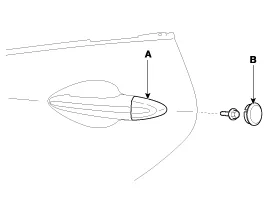
Remove the hole plug (B).
2.
After loosening the mounting bolt, then remove the rear door outside handle cover (A).

Tightening torque :
6.9 ~ 10.8 N.m (0.7 ~ 1.1 kgf.m, 5.1 ~ 8.0 lb-ft)

3.
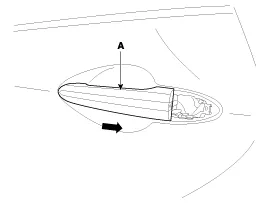
Remove the rear door outside handle (A) by pushing it in the direction of arrow.

4.
Install in the reverse order of removal.
   

    Component Location 1. Rear door outside handle

    Replacememt 1. Pull down the rear door window glass to the lowest level by pressing the power window glass switch. 2. After loosening the mounting screws, remove the rear door belt outside weartherstrip (A) by pulling it upward.

    Other information:

    Hyundai Genesis (DH) 2013-2016 Service Manual: LKAS Unit Repair procedures

    Removal 1. Disconnect the negative (-) battery terminal. 2. Remove the mirror wiring cover (A) and rain sensor cover (B). 3. Remove the LKAS unit connector (A). 4. Remove the LKAS unit after disengaging the mounting bracket (A). Installation 1.

    Hyundai Genesis (DH) 2013-2016 Service Manual: Blind Spot Detection Unit Repair procedures

    Removal 1. Disconnect the negative (-) battery terminal. 2. Remove the rear bumper. (Refer to Body - "Rear Bumper") 3. Remove the BSD unit (A) after loosening the mounting nuts.     Take care not to separate the bracket from rear bumper when removing the BSD sensor.

    Categories

     
    Copyright В© 2025 www.hgenesisdh.com - 0.0208