
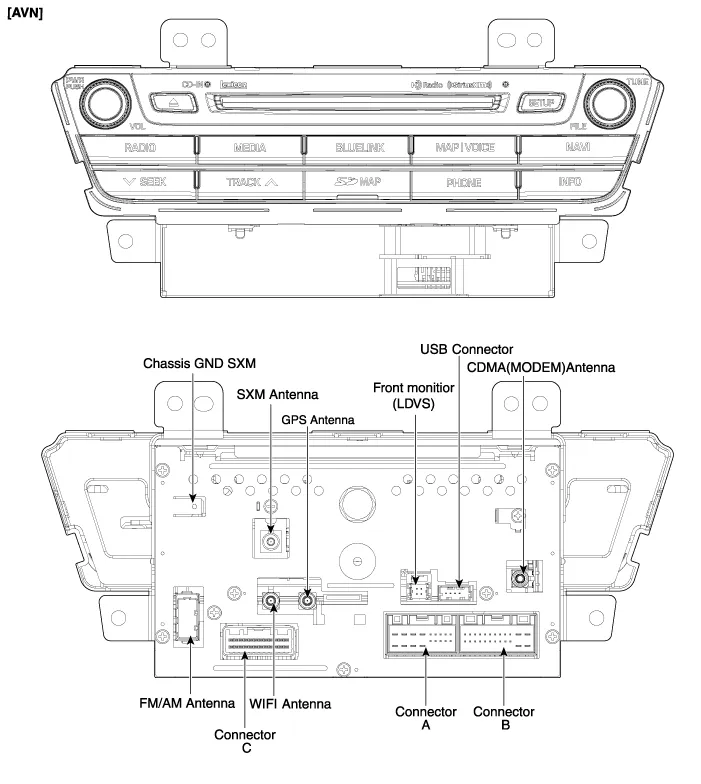
Hyundai Genesis (DH): AVN System / AVN(Audio Video Navigation) head unit Components and Components Location
| Components |
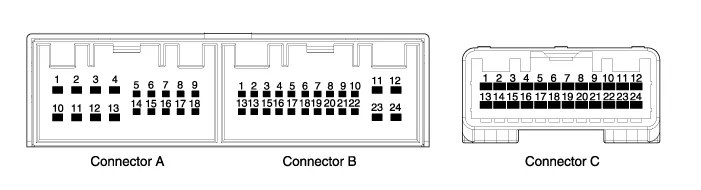
| No. | Connector A | Connector B | Connector C |
| 1 | - | Multmedia-CAN (High) | P-CAN (Low) |
| 2 | - | - | P-CAN (High) |
| 3 | - | - | Monitor touch_CAN (-) |
| 4 | - | - | Monitor touch_CAN (+) |
| 5 | SPDIF Shield GND | - | - |
| 6 | SPDIF (+) | MTS keypad signal | GND |
| 7 | - | AUX jack (Video) | Camera_C |
| 8 | Illumination (+) | AUX R input | Video GND_C |
| 9 | Reverse signal | AUX jack (Shield) | - |
| 10 | - | MIC (+) | - |
| 11 | - | B (+) | Body-CAN (High) |
| 12 | - | B (+) | Body-CAN (Low) |
| 13 | - | Multmedia-CAN (Low) | - |
| 14 | IGN 1 (+) | - | AIRBAG (Modem only) |
| 15 | SPDIF (-) | - | - |
| 16 | - | Vehicle speed | NAVI VOICE (-) |
| 17 | Illumination (-) | MTS keypad (GND) | NAVI VOICE (+) |
| 18 | Antenna B(+) | ACC | - |
| 19 | ? | AUX jack (Shield) | - |
| 20 | AUX jack (Detect) | - | |
| 21 | AUX L input | GND | |
| 22 | MIC (-) | Video GND_Y | |
| 23 | GND | Camera_Y | |
| 24 | GND | Carmera B(+) |
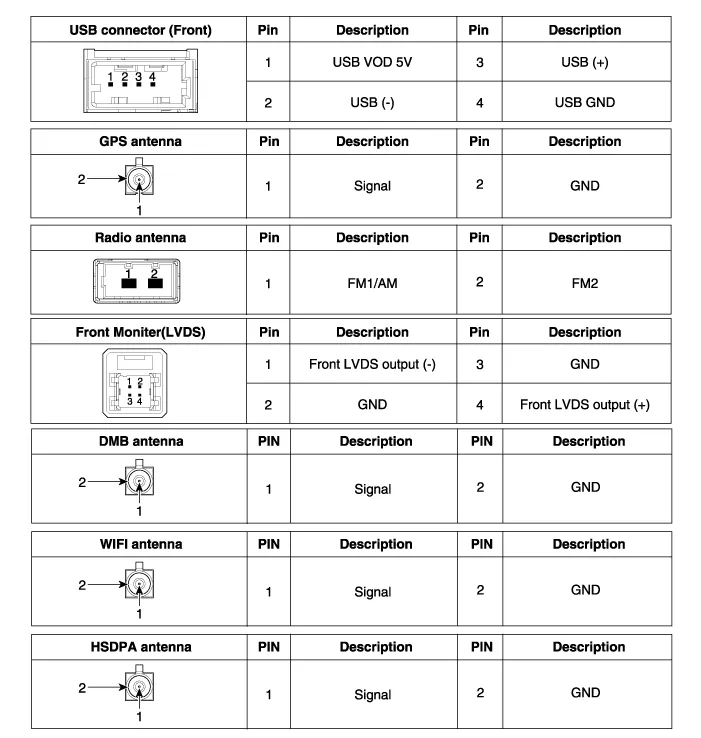
Description AVN system The AVN system has improved information search and easiness of manipulation for the driver by simplifying the system operation experience and unifying the display of the user information such as multimedia, air-conditioning and car information.
Removal - Take care not to scratch the crash pad and related parts. - Eject all discs before removing the AVN head unit not to damage the DVD player
Other information:
Hyundai Genesis (DH) 2013-2016 Service Manual: Start/Stop Button Repair procedures
Removal 1. Disconnect the negative(-) battery terminal. 2. Remove the driver crash pad lower panel. (Refer to Body - "Crash Pad Lower Panel") 3. Remove the start/stop button (A) from the center fascia garnish after loosening the mounting clip.
Hyundai Genesis (DH) 2013-2016 Service Manual: Blind Spot Detection Unit Repair procedures
Removal 1. Disconnect the negative (-) battery terminal. 2. Remove the rear bumper. (Refer to Body - "Rear Bumper") 3. Remove the BSD unit (A) after loosening the mounting nuts. Take care not to separate the bracket from rear bumper when removing the BSD sensor.
Categories
- Manuals Home
- Hyundai Genesis Owners Manual
- Hyundai Genesis Service Manual
- General Information
- Body (Interior and Exterior)
- Body Electrical System
- New on site
- Most important about car
