
Hyundai Genesis (DH): ECS(Electronic Control Suspension) System / Schematic Diagrams
| Schematic Diagrams |
| 1. |
Connector input/output
|
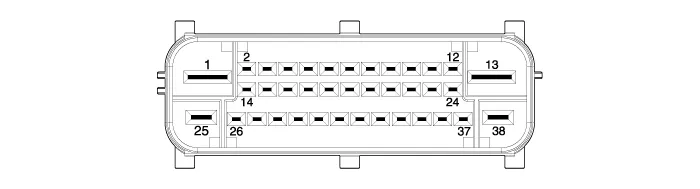
| 2. |
Circuit diagram
|
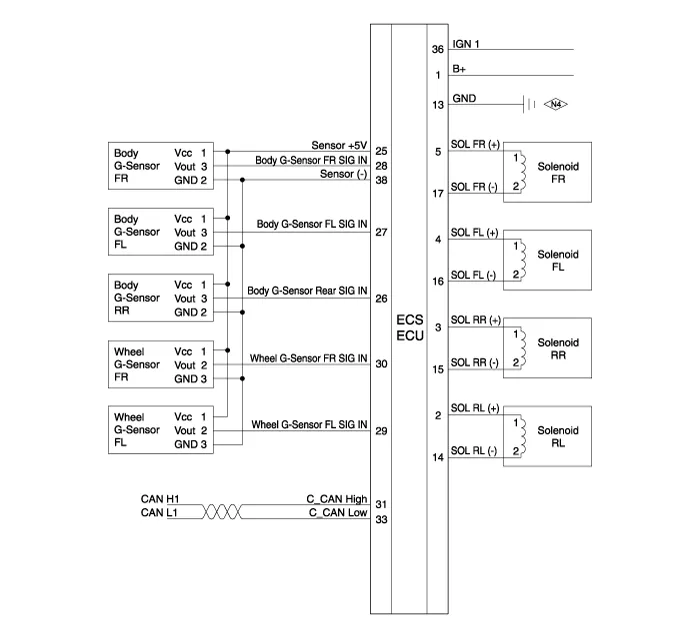
Description Real-time continuous control of the damping force according to vehicle running conditions and the state of road surface will enhance ride comfort and steering safety, including roll/pitch reduction in case of vehicle dynamics control, quick turning, braking, and starting.
Replacement 1. Disconnect the battery (-) terminal. 2. Remove the trunk luggage side trim [RH]. (Refer to Body - "Trunk Trim") 3. Disconnect the connector and then remove the ECS control unit.
Other information:
Hyundai Genesis (DH) 2013-2016 Service Manual: Auto Head Lamp Leveling Unit Troubleshooting
Inspection with GDS Initialization and diagnosis sequence by using GDS equipment. The following is the summarized A/S procedure. NoProcedure1Park the vehicle on level ground2Tire check3IGN1 ON4Head lamp Low Beam ON5Connection with diagnostic tool6Initial command by diagnostic tool7Clear DTC Code8IGN1 OFF > ON9Re- Connection with diagnostic t
Hyundai Genesis (DH) 2013-2016 Service Manual: Photo Sensor Repair procedures
Inspection 1. Turn the ignition switch ON. 2. Connect the GDS. 3. Emit intensive light toward the photo sensor using a lamp, and check the output voltage change. 4. The voltage will rise with higher intensive light and fall with lower intensive light.
Categories
- Manuals Home
- Hyundai Genesis Owners Manual
- Hyundai Genesis Service Manual
- Emission Control System
- Brake System
- Active Air Flap(AAF) Repair procedures
- New on site
- Most important about car
