
Hyundai Genesis (DH): Lighting System / Rheostat Repair procedures
Hyundai Genesis (DH) 2013-2016 Service Manual / Body Electrical System / Lighting System / Rheostat Repair procedures
| Inspection |
| 1. |
Disconnect the negative (-) battery terminal. |
| 2. |
Remove the crash pad lower panel.
(Refer to Body - "Crash Pad Lower Panel") |
| 3. |
Remove the lower crash pad switch assembly (A) after disengaging the mounting clip.
|
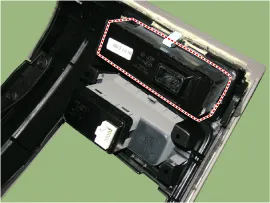
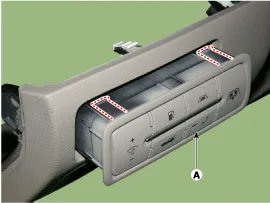
| 4. |
Remove the rheostat switch connector (A).
|
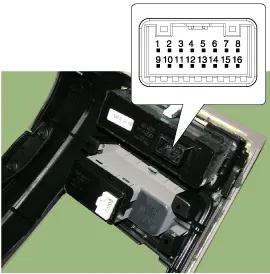
| 5. |
Check for intensity of new rheostat switch. If the light
intensity of the lamps changes smoothly without any flickering when the
rheostat is turned, it can be assumed that the rheostat is normal.
|
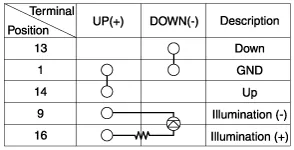
Components
Removal 1. Disconnect the negative (-) battery terminal. 2. Remove the front bumper. (Refer to Body - "Front Bumper Cover") 3. Disconnect the front fog lamp connector (A).
Other information:
Hyundai Genesis (DH) 2013-2016 Service Manual: Components and Components Location
C
Hyundai Genesis (DH) 2013-2016 Service Manual: Troubleshooting
Troubleshooting Problem Symptoms Table Before replacing or repairing air conditioning components, first determine if the malfunction is due to the refrigerant charge, air flow or compressor. Use the table below to help you find the cause of the problem.
Categories
- Manuals Home
- Hyundai Genesis Owners Manual
- Hyundai Genesis Service Manual
- Engine Electrical System
- Body Electrical System
- Engine Mechanical System
- New on site
- Most important about car

Copyright В© 2026 www.hgenesisdh.com - 0.0305