
Hyundai Genesis (DH): Brake System / Rear Disc Brake Components and Components Location
| Components |
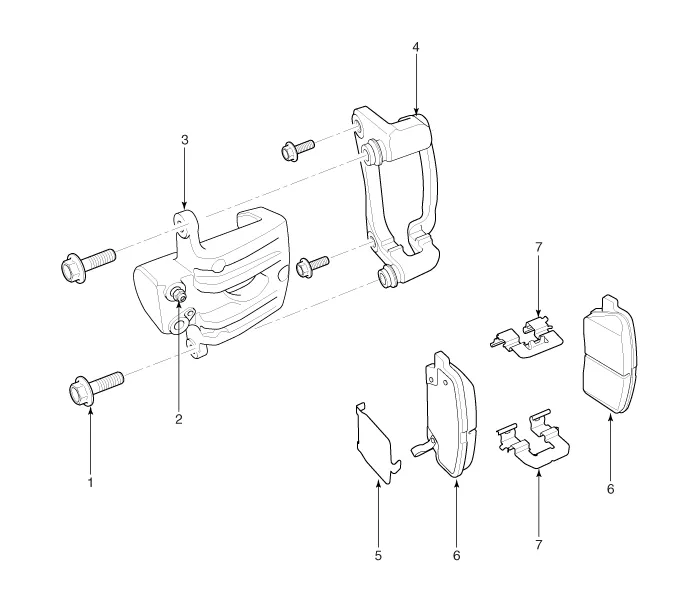
| 1. Guide rod bolt 2. Bleed screw 3. Caliper body 4. Caliper carrier | 5. Inner pad shim 6. Brake pad 7. Pad retainer |
Removal [4 Piston Type] 1. Remove the front wheel & tire. Tightening torque: 88.3 ~ 107.9 N.m (9.0 ~ 11.0 kgf.m, 65.1 ~ 79.6 lb-ft) 2.
Removal 1. Remove the rear wheel & tire. Tightening torque: 88.3 ~ 107.9 N.m (9.0 ~ 11.0 kgf.m, 65.1 ~ 79.6 lb-ft) 2. Loosen the guide rod bolt (B) and pivot the caliper up out of the way.
Other information:
Hyundai Genesis (DH) 2013-2016 Service Manual: Cluster Ionizer Repair procedures
Inspection 1. Press the MODE switch more than 4 times within 2 seconds while pressing the OFF switch. DisplayFail description00Normal51Cluster ion generator fault * For diagnostic procedure, refer to DTC guide. Replacement 1. Disconnect the negative (-) battery terminal.
Hyundai Genesis (DH) 2013-2016 Service Manual: Power Mosfet Repair procedures
Inspection 1. Turn the ignition switch ON. 2. Manually operate the control switch and control the voltage of the blower motor. 3. Select the control switch to raise the voltage until high speed. Specification Fan Speed (Manual)Motor Voltage (V)13.
Categories
- Manuals Home
- Hyundai Genesis Owners Manual
- Hyundai Genesis Service Manual
- Restraint
- Suspension System
- Repair procedures
- New on site
- Most important about car
