
Hyundai Genesis (DH): Front / Rear Parking Assist System / Parking Assist Sensor Repair procedures
Hyundai Genesis (DH) 2013-2016 Service Manual / Body Electrical System / Front / Rear Parking Assist System / Parking Assist Sensor Repair procedures
| Removal |
| 1. |
Disconnect the negative (-) battery terminal. |
| 2. |
Remove the front/rear bumper cover.
(Refer to Body - "Front Bumper Cover")
(Refer to Body - "Rear Bumper Cover") |
| 3. |
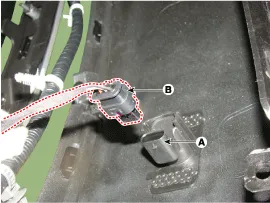
Disconnect the connector (B) from the parking assist sensor (A).
|
| 4. |
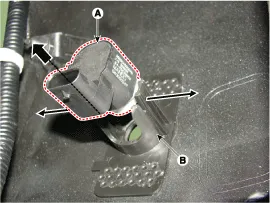
Remove the sensor (A) by pulling out both ends of the sensor holder (B).
|
| 5. |
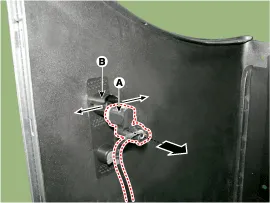
Remove the rear sensor (A) by pulling out both ends of the sensor holder (B).
|
| Installation |
| 1. |
Install the rear ultra sensor after connecting the connector. |
| 2. |
Install the bumper cover. |
| 3. |
Connect the negative (-) battery terminal. |
Categories
- Manuals Home
- Hyundai Genesis Owners Manual
- Hyundai Genesis Service Manual
- Suspension System
- Body Electrical System
- Electric Parking Brake (EPB) Repair procedures
- New on site
- Most important about car

Copyright В© 2026 www.hgenesisdh.com - 0.0307