
Hyundai Genesis (DH): Tires/Wheels / Wheel Repair procedures
Hyundai Genesis (DH) 2013-2016 Service Manual / Suspension System / Tires/Wheels / Wheel Repair procedures
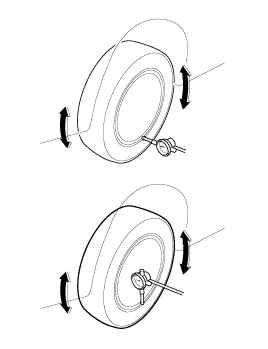
| Wheel Runout |
| 1. |
Jack up the vehicle and support it with jack stands. |
| 2. |
Measure the wheel runout with a dial indicator as illustrated. |
| 3. |
Replace the wheel if the wheel runout exceeds the limit.
| |||
| Wheel Nut Tightening |
| 1. |
Tightening torque.
|

| 2. |
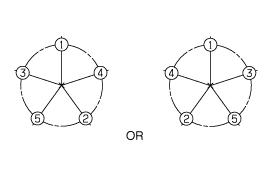
Tightening order.
Tighten the nuts by applying equal torque to each of them, according to the tightening order.
|
Inspection When using a wheel alignment tester to check the alignment of the wheels, make sure that the vehicle is horizontal and the front wheels are pointing straight ahead.
Other information:
Hyundai Genesis (DH) 2013-2016 Service Manual: Head Up Display Unit Repair procedures
Removal 1. Disconnect the negative (-) battery terminal. 2. Remove the head up display bezel (A). 3. Remove the instrument cluster. (Refer to Indicators And Guages - "Instrument Cluster") 4. Remove the head up display unit bracket (A) after loosening the mounting nuts.
Hyundai Genesis (DH) 2013-2016 Service Manual: Compressor Components and Components Location
C
Categories
- Manuals Home
- Hyundai Genesis Owners Manual
- Hyundai Genesis Service Manual
- Body Electrical System
- Body (Interior and Exterior)
- Active Air Flap(AAF) Repair procedures
- New on site
- Most important about car

Copyright В© 2026 www.hgenesisdh.com - 0.0372