
Hyundai Genesis (DH): Cooling System / Thermostat Repair procedures
| Removal and Installation |
Removal of the thermostat will have an adverse effect, leading to lowered cooling efficiency.
Do not remove the thermostat, even if the engine tends to overheat. |

| 1. |
Disconnect the battery "-" terminal from the trunk room. |
| 2. |
Drain engine coolant so its level is below thermostat.
(Refer to Cooling System - "Coolant") |
| 3. |
Remove the water inlet pipe.
(Refer to Cooling System - "Water Temperature Control Assembly") |
| 4. |
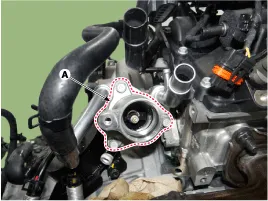
Remove the coolant inlet fitting (A).
|
| 5. |
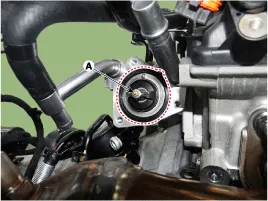
Remove the thermostat (A).
|
| 6. |
To install, reverse the removal procedure. |
| Inspection |
| 1. |
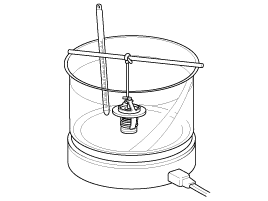
Immerse the thermostat in water and gradually heat the water.
|
| 2. |
Check the valve opening temperature.
Components 1. Water temperature control Assembly2. Thermostat3. Coolant inlet fitting Troubleshooting SymptomsPossible CausesRemedyCoolant leakage Other information:Hyundai Genesis (DH) 2013-2016 Service Manual: General Safety Information and CautionInstructions When Handling Refrigerant 1. R-134a liquid refrigerant is highly volatile. A drop on the skin of your hand could result in localized frostbite. When handling the refrigerant, be sure to wear gloves. 2. It is standard practice to wear goggles or glasses to protect your eyes, and gloves to protect your hands. Hyundai Genesis (DH) 2013-2016 Service Manual: In-car Sensor Description and OperationDescription An in-car air temperature sensor is located in the crash pad lower panel. The sensor contains a thermistor which measures the temperature of the cabin. The signal determined by the resistance value which changes in accordance with perceived inside temperature, is delivered to the heater control unit and according to this signa Categories

Copyright В© 2026 www.hgenesisdh.com - 0.0335
|